

| 일 | 월 | 화 | 수 | 목 | 금 | 토 |
|---|---|---|---|---|---|---|
| 1 | 2 | 3 | 4 | |||
| 5 | 6 | 7 | 8 | 9 | 10 | 11 |
| 12 | 13 | 14 | 15 | 16 | 17 | 18 |
| 19 | 20 | 21 | 22 | 23 | 24 | 25 |
| 26 | 27 | 28 | 29 | 30 | 31 |
Tags
- Freesound
- Coroutine
- AI
- 장자명언
- 생성AI
- 파이썬
- 명심보감
- 명언모음
- MCP
- 오늘의역사
- 좋은글필사하기
- FSM
- Skills
- 오픈소스
- Android
- DART
- Firebase
- kotlin
- 소울칼리버6
- gemini-cli
- 명언
- ASMR
- Linux
- 코틀린
- Gemini
- javascript
- Flutter
- Codex
- 이모지메모
Archives
- Today
- Total
Vintage appMaker의 Tech Blog
[codex] 채팅 스타일(종이느낌) skill로 정리하기 본문
채팅종이기록 스킬 배포 문서
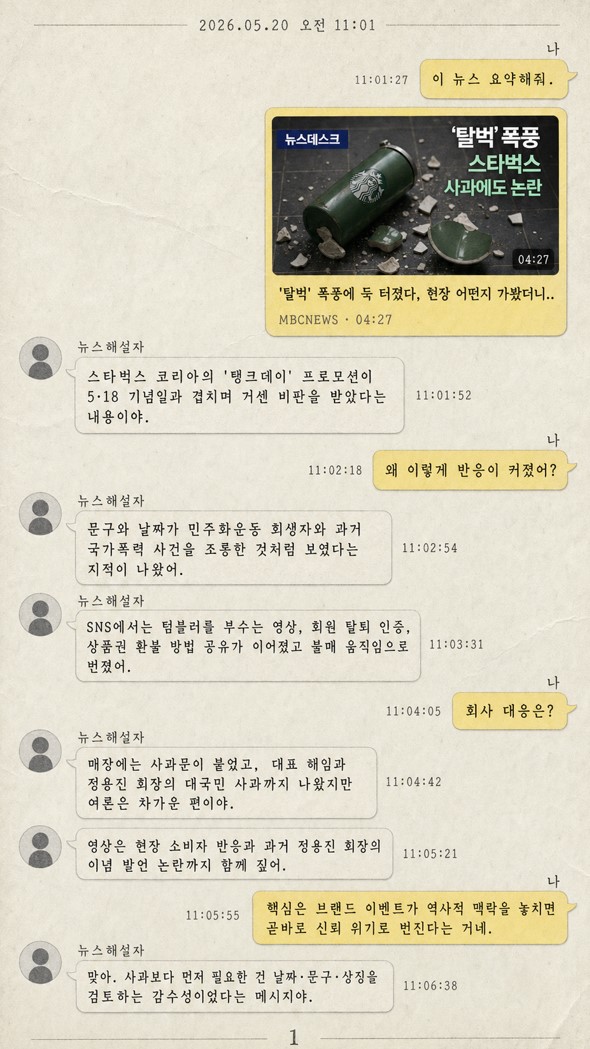
이 문서는 chat-paper-record 스킬을 다른 데스크탑에 그대로 설치해 사용할 수 있도록 필요한 파일 설명, 원본 파일 내용, 설치법, 간단한 프롬프트 예시만 정리한 문서다.
파일 구조
다음 구조 그대로 설치한다.
chat-paper-record/
  SKILL.md
  agents/
    openai.yaml
파일 설명
SKILL.md
Codex가 스킬을 인식하고 실행할 때 읽는 핵심 지침 파일이다. 스킬 이름, 자동 호출 설명, 입력 요약 방식, 유튜브 링크 처리, 2인 채팅 구성, 생성 시각 기반 타임스탬프, 종이 질감 채팅 이미지 생성 규칙을 담고 있다.
agents/openai.yaml
Codex UI에서 보이는 표시 이름, 짧은 설명, 기본 호출 프롬프트를 담는 보조 메타데이터 파일이다.
SKILL.md 원본
아래 내용을 chat-paper-record/SKILL.md로 저장한다.
---
name: chat-paper-record
description: Create Korean "채팅종이기록" outputs by summarizing provided text, notes, documents, or YouTube links into a two-person KakaoTalk-style messenger conversation rendered as paper-textured, typewriter-font images with generated timestamps. Use when the user asks for 채팅종이기록, chat paper record, paper chat logs, KakaoTalk-like chat summary images, or wants long content split into numbered chat-record images using the imagegen skill.
---

# Chat Paper Record

## Overview

Turn input content into a summarized two-person chat transcript and generate one or more raster images using `$imagegen`. The visual style must feel like a printed paper record: visible paper grain, soft ink, and typewriter-like lettering inside a KakaoTalk-inspired chat UI.

## Workflow

1. Parse the input.
   - If the input is ordinary text, notes, a transcript, or a document excerpt, summarize the key points first.
   - If the input contains a YouTube URL, fetch or infer the video title, thumbnail, and relevant metadata when possible, then build the first chat as a messenger share preview with the thumbnail.
   - Preserve factual meaning; do not invent claims beyond the provided content or discoverable video metadata.

2. Choose exactly two speakers.
   - Left speaker: choose a role/name that fits the content, such as `해설자`, `전문가`, `기자`, `선생님`, `분석가`, or a domain-specific persona.
   - Right speaker: always represent the user as `나`.
   - Keep the right speaker's messages shorter and more reactive unless the source content implies otherwise.

3. Convert the summary into chat turns.
   - Start with context-setting or a shared-link message.
   - Use natural Korean chat phrasing while keeping information dense.
   - Split long explanations into multiple concise bubbles.
   - End with a short takeaway or action-oriented closing message.

4. Generate timestamps.
   - Use the actual generation time in the user's locale as the base date/time.
   - The first message uses the generation time or the nearest rounded minute.
   - Increase each subsequent message by a random-looking interval between 10 seconds and 1 minute.
   - Show date and time in Korean-friendly form, for example `2026.05.20 오전 10:42`.

5. Plan image pagination.
   - If the conversation is short, create one image.
   - If it becomes long, split into multiple images named conceptually as `1`, `2`, `3`, and so on.
   - Each image should stand alone with a small page number or continuation marker, while preserving message order.
   - Keep each page readable on mobile; avoid overcrowding bubbles.

6. Create images with `$imagegen`.
   - Use the built-in image generation path from the imagegen skill unless the user explicitly asks for CLI fallback.
   - Generate one image per planned page.
   - If exact Korean text fidelity is critical, keep each image page's text amount moderate and provide text verbatim in the prompt.

## Visual Specification

Use these visual constraints in the image prompt:

- Format: vertical 9:16 or mobile-friendly portrait unless the user requests otherwise.
- UI: KakaoTalk-inspired chat screen, not an exact branded clone; left and right bubbles, profile circle on the left, right-side user bubbles, date divider, and subtle messenger share preview for YouTube links.
- Texture: warm off-white paper background, visible paper fibers, faint creases, lightly printed edges, and soft shadow like a scanned paper note.
- Typography: Korean typewriter or monospaced typewriter-like lettering, dark gray ink, slightly uneven print impression.
- Color: restrained messenger palette; pale yellow or cream for the user's bubbles, off-white or light gray for the other speaker's bubbles.
- Layout: readable margins, no overlapping text, no decorative clutter, no watermark.
- Page marker: when multiple pages are needed, include `1`, `2`, `3`, ... unobtrusively near the bottom.

## YouTube Link Handling

When the input is a YouTube link:

1. Retrieve video title, thumbnail, channel name, and duration when available.
2. Make the first left or right message look like a shared video card:
   - Thumbnail image at the top of the card.
   - Video title under the thumbnail.
   - Channel/source line in smaller text.
3. Continue with the two-person summary chat after the shared card.
4. If live metadata cannot be fetched, state that the thumbnail could not be verified and proceed using the URL and any user-provided context.

## Prompt Template

Use a prompt like this for each image page:

```text
Create a vertical 9:16 Korean messenger chat record image on textured paper.
Style: KakaoTalk-inspired chat UI, warm off-white paper grain, faint crease marks, soft scanned-paper shadow, Korean typewriter-style monospaced text, dark gray ink.
Date/time: "<generated date and time>"
Speakers: left is "<content-fit speaker>", right is "나".
Page: <page number> of <total pages>; include a small "<page number>" marker near the bottom.
Conversation bubbles, verbatim in order:
1. [left/right, timestamp] "<message>"
2. [left/right, timestamp] "<message>"
...
YouTube shared card if present: thumbnail from "<thumbnail source or attached/reference image>", title "<video title>", source "<channel/source>".
Constraints: Korean text must be legible, no overlapping UI, no watermark, no extra unsupported facts, keep paper texture visible.
Output Expectations
Return or save every generated page image. When reporting completion, list generated page count and saved paths if files were moved into the workspace.
## openai.yaml 원본

아래 내용을 `chat-paper-record/agents/openai.yaml`로 저장한다.

```yaml
interface:
  display_name: "채팅종이기록"
  short_description: "대화를 종이 질감 채팅 이미지로 변환합니다"
  default_prompt: "Use $chat-paper-record to summarize this content and turn it into paper-textured KakaoTalk-style chat images."

policy:
  allow_implicit_invocation: true
설치법
- 대상 데스크탑에서 다음 폴더를 만든다.
C:\Users\<사용자명>\.codex\skills\chat-paper-record
C:\Users\<사용자명>\.codex\skills\chat-paper-record\agents- 위의
SKILL.md 원본내용을 다음 경로에 저장한다.
C:\Users\<사용자명>\.codex\skills\chat-paper-record\SKILL.md- 위의
openai.yaml 원본내용을 다음 경로에 저장한다.
C:\Users\<사용자명>\.codex\skills\chat-paper-record\agents\openai.yaml- Codex를 새 세션으로 다시 열어 스킬이 인식되게 한다.
사용 예
텍스트 입력:
$chat-paper-record 아래 내용을 요약해서 채팅종이기록 이미지로 만들어줘:
오늘 회의에서는 출시 일정, 주요 리스크, 다음 액션을 논의했다.
유튜브 링크 입력:
$chat-paper-record 이 유튜브 내용을 요약해서 채팅종이기록 이미지로 만들어줘:
https://www.youtube.com/watch?v=...
'Source code or Tip > 생성AI' 카테고리의 다른 글
| [codex] 포스트잇 정리를 위한 skill (0) | 2026.07.09 |
|---|---|
| [codex] 해외뉴스(CNN, BBC) 가져와서 정리하기 (0) | 2026.07.01 |
| [codex] 오래된 신문 효과 Skill 만들기 (1) | 2026.05.20 |
| [codex] image gen을 활용한 분필칠판 효과 (0) | 2026.05.12 |
| [codex] chrome 확장 플러그인을 이용한 자동화 (0) | 2026.05.10 |
'Source code or Tip/생성AI' Related Articles
more


Comments