

| 일 | 월 | 화 | 수 | 목 | 금 | 토 |
|---|---|---|---|---|---|---|
| 1 | 2 | 3 | 4 | 5 | 6 | |
| 7 | 8 | 9 | 10 | 11 | 12 | 13 |
| 14 | 15 | 16 | 17 | 18 | 19 | 20 |
| 21 | 22 | 23 | 24 | 25 | 26 | 27 |
| 28 | 29 | 30 |
- 오늘의역사
- Coroutine
- kotlin
- 명언모음
- Skills
- ASMR
- Codex
- 소울칼리버6
- Freesound
- 명언
- 파이썬
- 생성AI
- Firebase
- 좋은글필사하기
- gemini-cli
- AI
- Flutter
- 이모지메모
- javascript
- 장자명언
- 코틀린
- 오픈소스
- Android
- MCP
- FSM
- Linux
- DART
- Gemini
- 명심보감
- Today
- Total
Vintage appMaker의 Tech Blog
pdf, jpg 변환 유틸리티를 TUI로 관리 본문
cnvt.py 개발자 매뉴얼
1. 사용목적
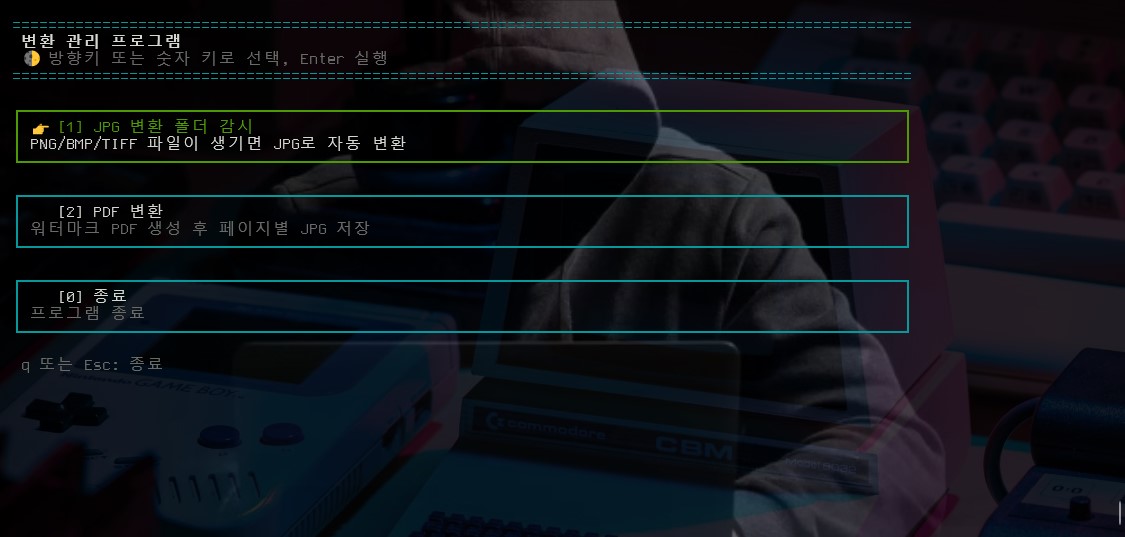
cnvt.py는 터미널에서 실행하는 파일 변환 관리 프로그램이다. 실행하면 방향키로 조작하는 콘솔 메뉴가 표시되며, 다음 두 가지 기능을 제공한다.
JPG 변환 폴더 감시: 지정한 폴더를 감시하다가 PNG, BMP, TIFF, TIF 파일이 생성되거나 변경되면 같은 위치에 JPG 파일로 자동 변환한다.PDF 변환: PDF 파일에 대각선 워터마크를 적용한*_watermarked_no_print.pdf파일을 만든 뒤, 각 페이지를1.jpg,2.jpg형식의 JPG 이미지로 저장한다.
주요 특징은 다음과 같다.
- Windows 콘솔 ANSI 색상 출력을 지원한다.
- 마우스 없이 방향키, Enter, Esc, Backspace로 파일과 폴더를 선택한다.
- 이미지 감시 기능은
watchdog을 사용해 파일 생성, 수정, 이동 이벤트를 처리한다. - 이미지 변환은
Pillow를 사용한다. - PDF 워터마크는
reportlab과PyPDF2를 사용한다. - PDF 페이지 렌더링은
PyMuPDF와Pillow를 사용한다. - 워터마크 PDF는 인쇄 권한을 제외한 제한 권한으로 암호화 저장한다.
2. 패키지설치 및 실행
권장 실행 환경
- Python 3.9 이상
- Windows PowerShell 또는 Windows Terminal 권장
- Linux/macOS에서도 대부분 동작하지만, Windows 콘솔 키 입력과 ANSI 처리에 맞춘 코드가 포함되어 있다.
패키지 설치
전체 기능을 사용하려면 다음 패키지가 필요하다.
python -m pip install Pillow watchdog PyPDF2 reportlab PyMuPDF기능별 최소 패키지는 다음과 같다.
# JPG 변환 폴더 감시
python -m pip install Pillow watchdog

# PDF 워터마크 및 JPG 변환
python -m pip install PyPDF2 reportlab PyMuPDF Pillow
실행
cnvt.py가 있는 폴더에서 다음 명령을 실행한다.
python cnvt.py실행 후 메뉴에서 다음 키를 사용한다.
↑ / ↓: 메뉴 또는 파일 목록 이동Enter: 선택 항목 실행Backspace: 파일 선택 화면에서 상위 폴더로 이동Esc: 선택 취소 또는 종료q: 메인 메뉴 종료1: JPG 변환 폴더 감시 바로 실행2: PDF 변환 바로 실행0: 종료
JPG 변환 폴더 감시 실행 흐름
- 메뉴에서
JPG 변환 폴더 감시를 선택한다. - 감시할 폴더를 선택한다.
- 해당 폴더에
.png,.bmp,.tiff,.tif파일이 생기거나 변경되면 JPG로 변환한다. - 변환 결과는 원본 파일과 같은 폴더에 같은 이름의
.jpg파일로 저장된다. Ctrl+C를 누르면 감시를 종료하고 이전 메뉴로 돌아간다.
PDF 변환 실행 흐름
- 메뉴에서
PDF 변환을 선택한다. - 변환할 PDF 파일을 선택한다.
- 워터마크 문구를 입력한다.
- 워터마크 투명도 값을 입력한다. 기본값은
0.2이며 범위는0.0 ~ 1.0이다. - JPG 품질 값을 입력한다. 기본값은
80이며 범위는1 ~ 100이다. - JPG 저장 폴더를 선택한다. 기본값은 PDF 파일이 있는 폴더의
images하위 폴더다. - 원본 PDF와 같은 폴더에
원본파일명_watermarked_no_print.pdf가 저장된다. - 워터마크 PDF의 각 페이지가 선택한 폴더에
1.jpg,2.jpg형식으로 저장된다.
3. 소스코드 예제설명
프로그램 상수
APP_TITLE = "변환 관리 프로그램"
SUPPORTED_IMAGE_EXTENSIONS = (".png", ".bmp", ".tiff", ".tif")APP_TITLE은 콘솔 화면 상단에 표시되는 프로그램 이름이다. SUPPORTED_IMAGE_EXTENSIONS는 폴더 감시 기능에서 JPG 변환 대상으로 인정하는 확장자 목록이다.
콘솔 출력 유틸리티
class Console:
    RESET = "\033[0m"
    BOLD = "\033[1m"
    ...
Console 클래스는 ANSI 색상, 화면 지우기, 커서 이동, 프레임 렌더링을 담당한다. enable_windows_ansi()는 Windows 콘솔에서도 ANSI 색상이 표시되도록 콘솔 모드를 설정한다.
파일과 폴더 선택 UI
def select_path(prompt, path_type, start_dir=None, default_path=None):
    current_dir = (start_dir or Path.cwd()).expanduser().resolve()
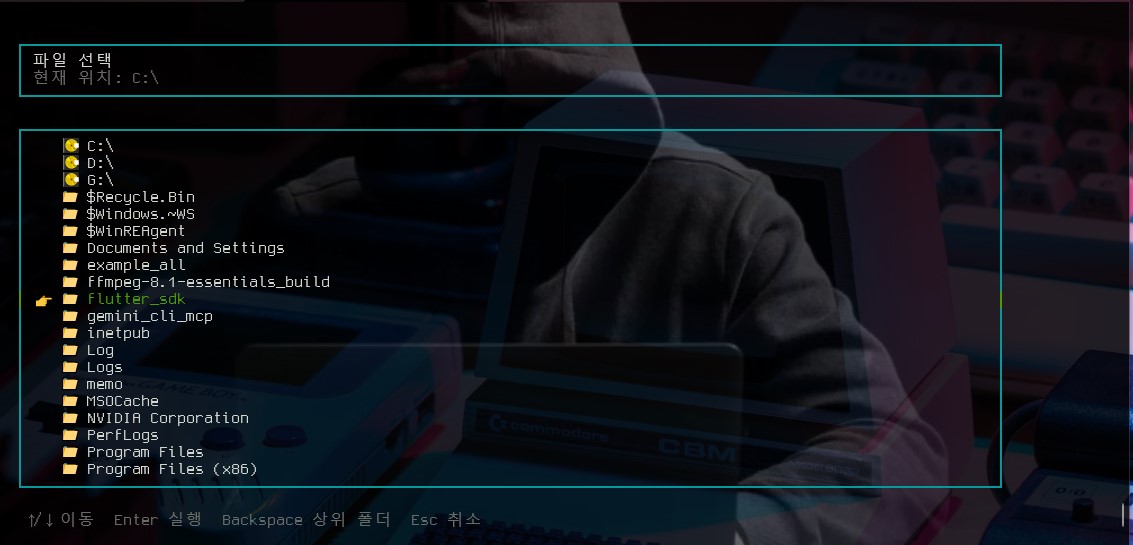
...select_path()는 터미널 안에서 파일 탐색기처럼 동작하는 선택 UI다. path_type이 "file"이면 파일을 선택하고, "directory"이면 폴더를 선택한다. 방향키, PageUp, PageDown, Backspace, Enter, Esc 입력을 처리한다.
메인 메뉴
def draw_menu(selected_index, frame):
    items = [
        MenuItem("1", "JPG 변환 폴더 감시", "PNG/BMP/TIFF 파일이 생기면 JPG로 자동 변환"),
        MenuItem("2", "PDF 변환", "워터마크 PDF 생성 후 페이지별 JPG 저장"),
        MenuItem("0", "종료", "프로그램 종료"),
]draw_menu()는 화면에 메뉴를 그리고, menu_loop()는 사용자의 키 입력을 받아 선택된 메뉴 번호를 반환한다.
작업 진행 화면
class Activity:
    def __init__(self, title):
        self.title = title
        self.messages = []
...Activity는 작업 로그를 별도 스레드에서 주기적으로 갱신해 보여준다. PDF 변환이나 폴더 감시처럼 시간이 걸리는 작업의 진행 상태를 화면에 표시하는 데 사용된다.
이미지 JPG 변환
def convert_image_to_jpg(source_path):
    from PIL import Image

    destination = source_path.with_suffix(".jpg")
    with Image.open(source_path) as image:
        image.convert("RGB").save(destination, "JPEG", quality=80)
    return destination
원본 이미지를 열고 RGB 모드로 변환한 뒤 JPEG 품질 80으로 저장한다. PNG의 투명 채널이나 TIFF의 다양한 색상 모드는 JPG 저장 전에 RGB로 변환된다.
파일 쓰기 완료 대기
def wait_until_file_ready(path, timeout=15.0, stable_seconds=0.6):
    ...
감시 대상 폴더에 파일이 생성되었더라도 아직 복사 중일 수 있다. 이 함수는 파일 크기가 일정 시간 안정적으로 유지되고 읽기 가능한 상태가 될 때까지 기다린다.
폴더 감시 기반 JPG 변환
def start_jpg_converter():
    ...
observer.schedule(ImageAutoConverterHandler(), str(target_dir), recursive=False)start_jpg_converter()는 사용자가 선택한 폴더를 watchdog.Observer로 감시한다. 생성, 수정, 이동 이벤트가 발생하면 큐에 넣고, 중복 변환을 막기 위해 pending 집합으로 처리 중인 파일을 관리한다.
워터마크 페이지 생성
def build_watermark_page(width, height, text, opacity):
    from PyPDF2 import PdfReader
    from reportlab.lib.colors import Color
    from reportlab.pdfgen import canvas
...reportlab으로 메모리 안에 단일 페이지 PDF를 만들고, 페이지 중앙에 대각선 워터마크 문구를 그린다. 생성된 PDF 페이지는 PyPDF2.PdfReader로 읽어 원본 PDF 페이지와 병합할 수 있는 객체로 반환된다.
PDF 워터마크 적용
def apply_watermark(input_pdf, output_pdf, text, opacity, progress=None):
    ...
    page.merge_page(watermark)
    writer.add_page(page)
원본 PDF의 각 페이지 크기에 맞는 워터마크 페이지를 만들고 병합한다. 저장 시 writer.encrypt()를 호출해 인쇄를 제외한 일부 권한만 허용하도록 설정한다.
PDF 페이지 JPG 저장
def convert_pdf_to_jpg(pdf_path, output_dir, quality=80, scale=2.0, progress=None):
    import fitz
    from PIL import Image
...PyMuPDF의 fitz로 PDF 페이지를 렌더링하고, Pillow 이미지로 변환한 뒤 JPG 파일로 저장한다. scale=2.0은 원본 PDF 좌표 대비 2배 해상도로 렌더링한다는 뜻이다.
프로그램 진입점
def main():
    Console.configure_output_encoding()
    Console.enable_windows_ansi()
    ...

if __name__ == "__main__":
main()main()은 출력 인코딩과 ANSI 색상 처리를 준비하고, 메인 메뉴 루프를 반복 실행한다. 사용자가 종료를 선택하면 커서 표시와 콘솔 스타일을 원래 상태로 되돌린다.
4. 전체소스코드
import io
import math
import os
import queue
import shutil
import sys
import threading
import time
import unicodedata
from dataclasses import dataclass
from pathlib import Path


APP_TITLE = "변환 관리 프로그램"
SUPPORTED_IMAGE_EXTENSIONS = (".png", ".bmp", ".tiff", ".tif")


class Console:
    RESET = "\033[0m"
    BOLD = "\033[1m"
    DIM = "\033[2m"
    RED = "\033[31m"
    GREEN = "\033[32m"
    YELLOW = "\033[33m"
    BLUE = "\033[34m"
    CYAN = "\033[36m"
    WHITE = "\033[37m"
    HIDE_CURSOR = "\033[?25l"
    SHOW_CURSOR = "\033[?25h"
    CLEAR_TO_END = "\033[J"

    @staticmethod
    def configure_output_encoding():
        for stream in (sys.stdout, sys.stderr):
            if hasattr(stream, "reconfigure"):
                stream.reconfigure(encoding="utf-8", errors="replace")

    @staticmethod
    def enable_windows_ansi():
        if os.name != "nt":
            return
        try:
            import ctypes

            kernel32 = ctypes.windll.kernel32
            handle = kernel32.GetStdHandle(-11)
            mode = ctypes.c_uint32()
            if kernel32.GetConsoleMode(handle, ctypes.byref(mode)):
                kernel32.SetConsoleMode(handle, mode.value | 0x0004)
        except Exception:
            pass

    @staticmethod
    def clear():
        print("\033[2J\033[H", end="")

    @staticmethod
    def move_home():
        print("\033[H", end="")

    @staticmethod
    def render_frame(lines):
        sys.stdout.write("\033[H")
        sys.stdout.write("\033[K\n".join(lines))
        sys.stdout.write("\033[K")
        sys.stdout.write(Console.CLEAR_TO_END)
        sys.stdout.flush()

    @staticmethod
    def color(text, color):
        return f"{color}{text}{Console.RESET}"


@dataclass
class MenuItem:
    key: str
    title: str
    description: str


def dependency_error(package_name, install_name=None):
    install = install_name or package_name
    print(Console.color(f"필요한 Python 패키지를 찾을 수 없습니다: {package_name}", Console.RED))
    print(f"설치 예: python -m pip install {install}")


def wait_for_key(message="계속하려면 아무 키나 누르세요."):
    print()
    print(Console.color(message, Console.DIM))
    read_key()


def read_key(timeout=None):
    if os.name == "nt":
        import msvcrt

        if timeout is not None:
            deadline = time.monotonic() + timeout
            while time.monotonic() < deadline:
                if msvcrt.kbhit():
                    break
                time.sleep(0.01)
            else:
                return None

        key = msvcrt.getwch()
        if key in ("\x00", "\xe0"):
            key += msvcrt.getwch()
        return key

    if timeout is not None:
        import select

        readable, _, _ = select.select([sys.stdin], [], [], timeout)
        if not readable:
            return None

    import termios
    import tty

    fd = sys.stdin.fileno()
    old = termios.tcgetattr(fd)
    try:
        tty.setraw(fd)
        return sys.stdin.read(1)
    finally:
        termios.tcsetattr(fd, termios.TCSADRAIN, old)


def prompt_line(prompt, default=None, required=False):
    while True:
        suffix = f" [{default}]" if default is not None else ""
        value = input(f"{prompt}{suffix}: ").strip().strip('"')
        if not value and default is not None:
            return str(default)
        if value or not required:
            return value
        print(Console.color("값을 입력하세요.", Console.YELLOW))


def is_up_key(key):
    return key in ("\xe0H", "\x1b[A")


def is_down_key(key):
    return key in ("\xe0P", "\x1b[B")


def is_right_key(key):
    return key in ("\xe0M", "\x1b[C")


def is_page_up_key(key):
    return key in ("\xe0I", "\x1b[5~")


def is_page_down_key(key):
    return key in ("\xe0Q", "\x1b[6~")


def available_windows_drives():
    if os.name != "nt":
        return []
    drives = []
    for letter in "ABCDEFGHIJKLMNOPQRSTUVWXYZ":
        drive = Path(f"{letter}:\\")
        if drive.exists():
            drives.append(drive)
    return drives


def path_menu_entries(current_dir, path_type):
    entries = []
    if current_dir.parent != current_dir:
        entries.append(("parent", current_dir.parent, "⬆️  .."))
    elif os.name == "nt":
        for drive in available_windows_drives():
            entries.append(("directory", drive, f"💽 {drive}"))

    if path_type == "directory":
        entries.append(("select_directory", current_dir, "✅ 현재 폴더 선택"))

    try:
        children = sorted(
            current_dir.iterdir(),
            key=lambda path: (not path.is_dir(), path.name.lower()),
        )
    except OSError:
        children = []

    for child in children:
        if child.is_dir():
            entries.append(("directory", child, f"📁 {child.name}"))
        elif path_type == "file" and child.is_file():
            entries.append(("file", child, f"📄 {child.name}"))
    return entries


def select_path(prompt, path_type, start_dir=None, default_path=None):
    current_dir = (start_dir or Path.cwd()).expanduser().resolve()
    if current_dir.is_file():
        current_dir = current_dir.parent
    selected = 0
    scroll = 0
    frame = 0
    Console.clear()

    while True:
        entries = path_menu_entries(current_dir, path_type)
        if default_path is not None:
            entries.insert(0, ("default", Path(default_path).expanduser(), f"⭐ 기본값 사용: {default_path}"))
        if not entries:
            entries = [("empty", current_dir, "선택 가능한 항목이 없습니다.")]

        selected = min(selected, len(entries) - 1)
        terminal_size = shutil.get_terminal_size((80, 24))
        width = min(max(terminal_size.columns - 4, 54), 110)
        list_height = max(6, terminal_size.lines - 10)
        if selected < scroll:
            scroll = selected
        elif selected >= scroll + list_height:
            scroll = selected - list_height + 1

        animation = ["🧭", "🔎", "📂", "✨"][frame % 4]
        frame += 1
        mode_label = "파일 선택" if path_type == "file" else "폴더 선택"
        lines = header_lines(f"{animation} {prompt}")
        lines.append("")
        lines.extend(box_lines(mode_label, [f"현재 위치: {current_dir}"], width))
        lines.append("")

        visible_entries = entries[scroll : scroll + list_height]
        lines.append(Console.color(f"┌{'─' * (width - 2)}┐", Console.CYAN))
        for index, (entry_type, path, label) in enumerate(visible_entries, start=scroll):
            selected_entry = index == selected
            marker = "👉 " if selected_entry else "   "
            suffix = ""
            if entry_type in ("file", "select_directory", "default"):
                suffix = "  Enter"
            elif path_type == "directory" and entry_type in ("directory", "parent"):
                suffix = ""
            elif entry_type in ("directory", "parent"):
                suffix = ""
            line = fit_display_width(f"{marker}{label}{suffix}", width - 4)
            color = Console.GREEN if selected_entry else Console.WHITE if entry_type != "empty" else Console.DIM
            border = Console.GREEN if selected_entry else Console.CYAN
            lines.append(f"{Console.color('│', border)} {Console.color(line, color)} {Console.color('│', border)}")
        lines.append(Console.color(f"└{'─' * (width - 2)}┘", Console.CYAN))

        lines.append("")
        lines.append(Console.color(" ↑/↓ 이동  Enter 실행  Backspace 상위 폴더  Esc 취소", Console.DIM))
        Console.render_frame(lines)

        key = read_key()
        if is_up_key(key):
            selected = (selected - 1) % len(entries)
        elif is_down_key(key):
            selected = (selected + 1) % len(entries)
        elif is_page_up_key(key):
            selected = max(0, selected - list_height)
        elif is_page_down_key(key):
            selected = min(len(entries) - 1, selected + list_height)
        elif key in ("\b", "\x7f"):
            if current_dir.parent != current_dir:
                current_dir = current_dir.parent
                selected = 0
                scroll = 0
        elif is_right_key(key):
            entry_type, path, _ = entries[selected]
            if entry_type in ("directory", "parent"):
                current_dir = path.resolve()
                selected = 0
                scroll = 0
        elif key == "\x1b":
            return None
        elif key in ("\r", "\n"):
            entry_type, path, _ = entries[selected]
            if entry_type == "default":
                Console.clear()
                return path.resolve()
            if entry_type == "select_directory":
                Console.clear()
                return path.resolve()
            if entry_type == "parent":
                current_dir = path.resolve()
                selected = 0
                scroll = 0
                continue
            if entry_type in ("directory", "parent"):
                current_dir = path.resolve()
                selected = 0
                scroll = 0
            elif entry_type == "file":
                Console.clear()
                return path.resolve()


def prompt_existing_path(prompt, path_type):
    while True:
        path = select_path(prompt, path_type)
        if path is None:
            print()
            print(Console.color("경로 선택이 취소되었습니다. 다시 선택하세요.", Console.YELLOW))
            wait_for_key()
            Console.clear()
            continue
        if path_type == "file" and path.is_file():
            return path
        if path_type == "directory" and path.is_dir():
            return path
        print(Console.color(f"경로가 올바르지 않습니다: {path}", Console.YELLOW))


def prompt_float(prompt, default, minimum, maximum):
    while True:
        raw = prompt_line(prompt, default=default)
        try:
            value = float(raw)
        except ValueError:
            print(Console.color(f"{minimum} 이상 {maximum} 이하의 숫자를 입력하세요.", Console.YELLOW))
            continue
        if minimum <= value <= maximum:
            return value
        print(Console.color(f"{minimum} 이상 {maximum} 이하의 숫자를 입력하세요.", Console.YELLOW))


def prompt_int(prompt, default, minimum, maximum):
    while True:
        raw = prompt_line(prompt, default=default)
        try:
            value = int(raw)
        except ValueError:
            print(Console.color(f"{minimum} 이상 {maximum} 이하의 정수를 입력하세요.", Console.YELLOW))
            continue
        if minimum <= value <= maximum:
            return value
        print(Console.color(f"{minimum} 이상 {maximum} 이하의 정수를 입력하세요.", Console.YELLOW))


def draw_header(subtitle=""):
    width = min(max(shutil.get_terminal_size((80, 24)).columns, 54), 100)
    line = "=" * width
    print(Console.color(line, Console.CYAN))
    print(Console.color(f" {APP_TITLE}", Console.BOLD + Console.WHITE))
    if subtitle:
        print(Console.color(f" {subtitle}", Console.DIM))
    print(Console.color(line, Console.CYAN))


def header_lines(subtitle=""):
    width = min(max(shutil.get_terminal_size((80, 24)).columns, 54), 100)
    line = "=" * width
    lines = [
        Console.color(line, Console.CYAN),
        Console.color(f" {APP_TITLE}", Console.BOLD + Console.WHITE),
    ]
    if subtitle:
        lines.append(Console.color(f" {subtitle}", Console.DIM))
    lines.append(Console.color(line, Console.CYAN))
    return lines


def fit_display_width(text, width, fill=" "):
    result = []
    current_width = 0
    for char in text:
        char_width = 0 if unicodedata.combining(char) else 2 if unicodedata.east_asian_width(char) in ("F", "W") else 1
        if current_width + char_width > width:
            break
        result.append(char)
        current_width += char_width
    return "".join(result) + fill * max(0, width - current_width)


def box_lines(title, body_lines, width, selected=False):
    border_color = Console.GREEN if selected else Console.CYAN
    title_color = Console.GREEN if selected else Console.WHITE
    inner_width = max(10, width - 4)
    top = f"┌{'─' * (width - 2)}┐"
    bottom = f"└{'─' * (width - 2)}┘"
    lines = [Console.color(top, border_color)]
    for index, line in enumerate([title, *body_lines]):
        visible = fit_display_width(line, inner_width)
        content_color = title_color if index == 0 else Console.WHITE if selected else Console.DIM
        lines.append(f"{Console.color('│', border_color)} {Console.color(visible, content_color)} {Console.color('│', border_color)}")
    lines.append(Console.color(bottom, border_color))
    return lines


def draw_box(title, body_lines, width=None):
    terminal_width = shutil.get_terminal_size((80, 24)).columns
    width = width or min(max(terminal_width - 4, 54), 100)
    for line in box_lines(title, body_lines, width):
        print(line)


def draw_menu(selected_index, frame):
    items = [
        MenuItem("1", "JPG 변환 폴더 감시", "PNG/BMP/TIFF 파일이 생기면 JPG로 자동 변환"),
        MenuItem("2", "PDF 변환", "워터마크 PDF 생성 후 페이지별 JPG 저장"),
        MenuItem("0", "종료", "프로그램 종료"),
    ]
    animation = ["🌕", "🌖", "🌗", "🌘", "🌑", "🌒", "🌓", "🌔"][frame % 8]
    terminal_width = shutil.get_terminal_size((80, 24)).columns
    menu_width = min(max(terminal_width - 4, 54), 100)
    lines = header_lines(f"{animation} 방향키 또는 숫자 키로 선택, Enter 실행")
    lines.append("")
    for index, item in enumerate(items):
        selected = index == selected_index
        marker = "👉" if selected else "  "
        title = f"{marker} [{item.key}] {item.title}"
        lines.extend(box_lines(title, [item.description], menu_width, selected=selected))
        lines.append("")
    lines.append(Console.color(" q 또는 Esc: 종료", Console.DIM))
    Console.render_frame(lines)


def menu_loop():
    selected = 0
    frame = 0
    key_to_index = {"1": 0, "2": 1, "0": 2}
    Console.clear()

    while True:
        draw_menu(selected, frame)
        frame += 1
        key = read_key(timeout=0.15)
        if key is None:
            continue

        if key in ("\r", "\n"):
            return ["1", "2", "0"][selected]
        if key in ("q", "Q", "\x1b"):
            return "0"
        if key in key_to_index:
            return key
        if is_up_key(key):
            selected = (selected - 1) % 3
        elif is_down_key(key):
            selected = (selected + 1) % 3


class Activity:
    def __init__(self, title):
        self.title = title
        self.messages = []
        self.running = False
        self.thread = None
        self.frame = 0

    def log(self, message):
        timestamp = time.strftime("%H:%M:%S")
        self.messages.append(f"[{timestamp}] {message}")
        self.messages = self.messages[-12:]

    def start(self):
        self.running = True
        self.thread = threading.Thread(target=self._render_loop, daemon=True)
        self.thread.start()

    def stop(self):
        self.running = False
        if self.thread:
            self.thread.join(timeout=1.0)

    def _render_loop(self):
        while self.running:
            self.render()
            time.sleep(0.15)

    def render(self):
        animation = ["⏳", "⌛", "🔄", "✨"][self.frame % 4]
        self.frame += 1
        lines = header_lines(f"{animation} {self.title}")
        lines.append("")
        terminal_width = shutil.get_terminal_size((80, 24)).columns
        box_width = min(max(terminal_width - 4, 54), 100)
        body = self.messages[:] or ["작업을 준비하는 중입니다."]
        lines.extend(box_lines("작업 로그", body, box_width))
        lines.append("")
        lines.append(Console.color("Ctrl+C를 누르면 이전 메뉴로 돌아갑니다.", Console.DIM))
        Console.render_frame(lines)


def convert_image_to_jpg(source_path):
    try:
        from PIL import Image
    except ImportError:
        dependency_error("Pillow", "Pillow")
        return False

    destination = source_path.with_suffix(".jpg")
    with Image.open(source_path) as image:
        image.convert("RGB").save(destination, "JPEG", quality=80)
    return destination


def is_supported_image_path(path):
    return Path(path).suffix.lower() in SUPPORTED_IMAGE_EXTENSIONS


def wait_until_file_ready(path, timeout=15.0, stable_seconds=0.6):
    deadline = time.monotonic() + timeout
    last_size = None
    stable_since = None

    while time.monotonic() < deadline:
        try:
            if not path.is_file():
                time.sleep(0.15)
                continue
            size = path.stat().st_size
            with path.open("rb") as handle:
                handle.read(1)
        except OSError:
            last_size = None
            stable_since = None
            time.sleep(0.15)
            continue

        now = time.monotonic()
        if size == last_size:
            stable_since = stable_since or now
            if now - stable_since >= stable_seconds:
                return True
        else:
            last_size = size
            stable_since = now
        time.sleep(0.15)

    return False


def start_jpg_converter():
    Console.clear()
    draw_header("JPG 변환 폴더 감시")
    print()
    target_dir = prompt_existing_path("감시할 폴더 경로를 입력하세요", "directory")

    try:
        from watchdog.events import FileSystemEventHandler
        from watchdog.observers import Observer
    except ImportError:
        dependency_error("watchdog", "watchdog")
        wait_for_key()
        return

    events = queue.Queue()
    pending = set()
    pending_lock = threading.Lock()

    def enqueue_image(source, reason):
        source = Path(source)
        if not is_supported_image_path(source):
            return
        with pending_lock:
            if source in pending:
                return
            pending.add(source)
        events.put((source, reason))

    class ImageAutoConverterHandler(FileSystemEventHandler):
        def on_created(self, event):
            if event.is_directory:
                return
            enqueue_image(event.src_path, "생성")

        def on_modified(self, event):
            if event.is_directory:
                return
            enqueue_image(event.src_path, "변경")

        def on_moved(self, event):
            if event.is_directory:
                return
            enqueue_image(event.dest_path, "이동")

    activity = Activity(f"감시 중: {target_dir}")
    activity.log("새 이미지 파일을 기다리는 중입니다.")
    observer = Observer()
    observer.schedule(ImageAutoConverterHandler(), str(target_dir), recursive=False)

    try:
        observer.start()
        activity.start()
        for source in target_dir.iterdir():
            if source.is_file() and is_supported_image_path(source):
                enqueue_image(source, "기존 파일")
        while True:
            try:
                source, reason = events.get(timeout=0.2)
            except queue.Empty:
                continue
            try:
                activity.log(f"{reason} 감지: {source.name}")
                if not wait_until_file_ready(source):
                    activity.log(f"변환 보류: 파일을 읽을 수 없습니다 ({source.name})")
                    continue
                destination = convert_image_to_jpg(source)
                activity.log(f"변환 완료: {source.name} -> {destination.name}")
            except Exception as exc:
                activity.log(f"변환 실패: {source.name} ({exc})")
            finally:
                with pending_lock:
                    pending.discard(source)
    except KeyboardInterrupt:
        activity.log("감시를 종료합니다.")
    finally:
        observer.stop()
        observer.join()
        activity.stop()


def build_watermark_page(width, height, text, opacity):
    from PyPDF2 import PdfReader
    from reportlab.lib.colors import Color
    from reportlab.pdfgen import canvas

    packet = io.BytesIO()
    pdf = canvas.Canvas(packet, pagesize=(width, height))
    pdf.saveState()
    pdf.setFillColor(Color(0.35, 0.35, 0.35, alpha=opacity))
    font_size = max(32, min(width, height) / 9)
    pdf.setFont("Helvetica-Bold", font_size)
    rotation = math.degrees(math.atan2(height, width))
    pdf.translate(width / 2, height / 2)
    pdf.rotate(rotation)
    pdf.drawCentredString(0, -font_size * 0.35, text)
    pdf.restoreState()
    pdf.showPage()
    pdf.save()
    packet.seek(0)
    return PdfReader(packet).pages[0]


def apply_watermark(input_pdf, output_pdf, text, opacity, progress=None):
    from PyPDF2 import PdfReader, PdfWriter
    from PyPDF2.constants import UserAccessPermissions

    reader = PdfReader(str(input_pdf))
    writer = PdfWriter()
    permissions = (
        UserAccessPermissions.EXTRACT
        | UserAccessPermissions.EXTRACT_TEXT_AND_GRAPHICS
        | UserAccessPermissions.FILL_FORM_FIELDS
        | UserAccessPermissions.ASSEMBLE_DOC
    )

    page_count = len(reader.pages)
    for index, page in enumerate(reader.pages, start=1):
        width = float(page.mediabox.width)
        height = float(page.mediabox.height)
        watermark = build_watermark_page(width, height, text, opacity)
        page.merge_page(watermark)
        writer.add_page(page)
        if progress:
            progress(f"워터마크 적용 중: {index}/{page_count} 페이지")

    writer.encrypt(
        user_password="",
        owner_password="vintage_appMaker_owner",
        permissions_flag=permissions,
    )

    with output_pdf.open("wb") as handle:
        writer.write(handle)


def convert_pdf_to_jpg(pdf_path, output_dir, quality=80, scale=2.0, progress=None):
    try:
        import fitz
        from PIL import Image
    except ImportError as exc:
        missing = getattr(exc, "name", "필수 패키지")
        dependency_error(missing, "PyMuPDF Pillow")
        raise

    output_dir.mkdir(parents=True, exist_ok=True)
    document = fitz.open(pdf_path)
    matrix = fitz.Matrix(scale, scale)
    saved_files = []

    try:
        page_count = document.page_count
        for index, page in enumerate(document, start=1):
            pixmap = page.get_pixmap(matrix=matrix, alpha=False)
            image = Image.frombytes("RGB", [pixmap.width, pixmap.height], pixmap.samples)
            output_path = output_dir / f"{index}.jpg"
            image.save(output_path, "JPEG", quality=quality, optimize=True)
            saved_files.append(output_path)
            if progress:
                progress(f"JPG 저장 중: {index}/{page_count} 페이지")
    finally:
        document.close()

    return saved_files


def start_pdf_converter():
    Console.clear()
    draw_header("PDF 변환")
    print()
    pdf_path = prompt_existing_path("변환할 PDF 파일 경로를 입력하세요", "file")

    while True:
        watermark_text = prompt_line("워터마크 문구를 입력하세요", required=True).strip()
        if watermark_text:
            break
        print(Console.color("워터마크 문구는 필수입니다.", Console.YELLOW))

    opacity = prompt_float("워터마크 투명도(0.0 ~ 1.0)", 0.2, 0.0, 1.0)
    quality = prompt_int("JPG 품질(1 ~ 100)", 80, 1, 100)
    output_dir = select_path(
        "JPG 저장 폴더를 선택하세요",
        "directory",
        start_dir=pdf_path.parent,
        default_path=pdf_path.parent / "images",
    )
    if output_dir is None:
        output_dir = pdf_path.parent / "images"
    watermarked_pdf = pdf_path.parent / f"{pdf_path.stem}_watermarked_no_print.pdf"

    try:
        import PyPDF2  # noqa: F401
        import reportlab  # noqa: F401
    except ImportError as exc:
        missing = getattr(exc, "name", "필수 패키지")
        dependency_error(missing, "PyPDF2 reportlab")
        wait_for_key()
        return

    activity = Activity("PDF 워터마크 및 JPG 변환")
    activity.log(f"입력 PDF: {pdf_path}")
    activity.start()

    try:
        apply_watermark(pdf_path, watermarked_pdf, watermark_text, opacity, activity.log)
        activity.log(f"워터마크 PDF 저장: {watermarked_pdf}")
        saved_files = convert_pdf_to_jpg(watermarked_pdf, output_dir, quality=quality, progress=activity.log)
        activity.log(f"완료: JPG {len(saved_files)}개 저장 ({output_dir})")
        time.sleep(0.5)
    except Exception as exc:
        activity.log(f"오류: {exc}")
        time.sleep(0.5)
    finally:
        activity.stop()

    print()
    wait_for_key()


def main():
    Console.configure_output_encoding()
    Console.enable_windows_ansi()
    try:
        print(Console.HIDE_CURSOR, end="")
        while True:
            choice = menu_loop()
            if choice == "1":
                start_jpg_converter()
            elif choice == "2":
                start_pdf_converter()
            elif choice == "0":
                Console.clear()
                print("종료합니다.")
                return
    finally:
        print(Console.SHOW_CURSOR + Console.RESET, end="")


if __name__ == "__main__":
    main()

'Source code or Tip > python' 카테고리의 다른 글
| [python] pdf에 워터마크 및 jpg로 출력하기 (0) | 2026.06.12 |
|---|---|
| [이미지 변환] jpg로 압축변환 (1) | 2026.06.11 |
| python에서 case - 딕셔너리와 함수 (0) | 2020.12.30 |
| python에서 간단한 RPC 구현 (Ubuntu <--> Windows) (0) | 2020.12.09 |
| [github] 파이썬 확장모듈(C++) 만들기 (0) | 2020.12.03 |


