

| 일 | 월 | 화 | 수 | 목 | 금 | 토 |
|---|---|---|---|---|---|---|
| 1 | 2 | |||||
| 3 | 4 | 5 | 6 | 7 | 8 | 9 |
| 10 | 11 | 12 | 13 | 14 | 15 | 16 |
| 17 | 18 | 19 | 20 | 21 | 22 | 23 |
| 24 | 25 | 26 | 27 | 28 | 29 | 30 |
| 31 |
Tags
- Codex
- 장자명언
- DART
- 소울칼리버6
- 오늘의역사
- MCP
- 명언
- Linux
- ASMR
- Skills
- Android
- Coroutine
- 명언모음
- 좋은글필사하기
- Freesound
- 명상명언
- 오픈소스
- kotlin
- FSM
- 파이썬
- javascript
- AI
- 생성AI
- Firebase
- Flutter
- 이모지메모
- 명심보감
- gemini-cli
- Gemini
- 코틀린
Archives
- Today
- Total
Vintage appMaker의 Tech Blog
[codex] 윈도우 사용자 폴더정리 - 스킬등록 본문
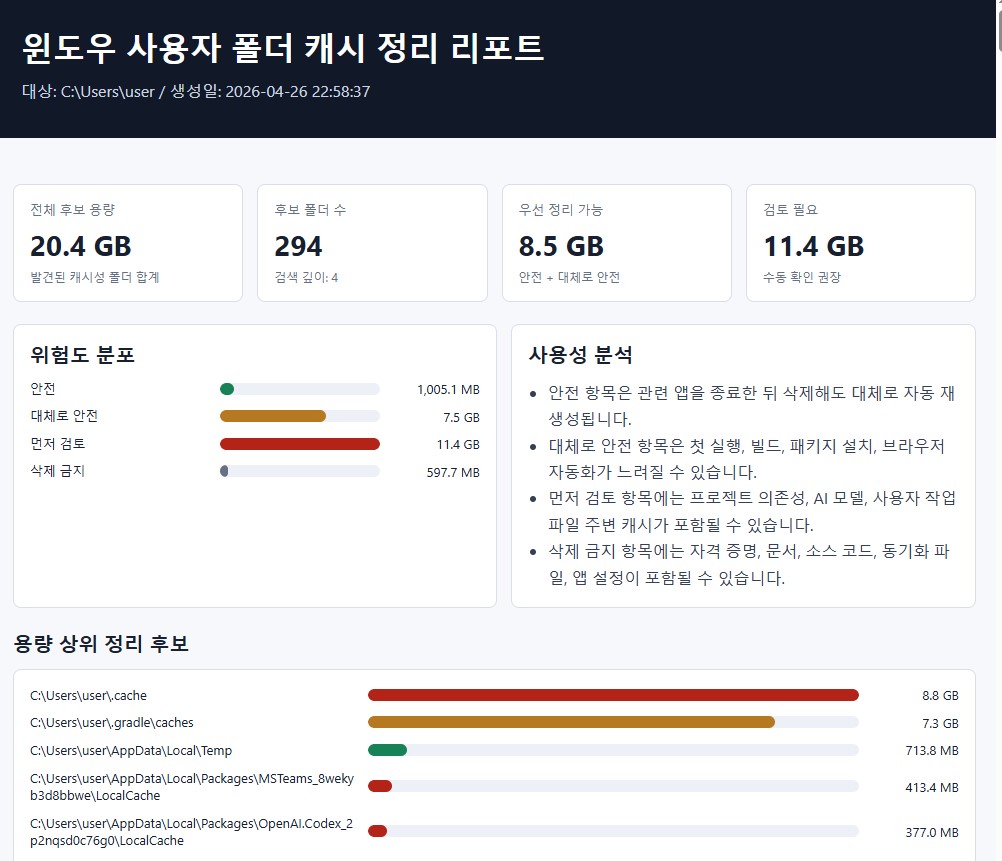
윈도우 사용자 폴더 정리
윈도우를 사용하다보면 다양한 프로그램들이 사용자 폴더 안에 캐쉬 정보를 저장한다. 그러나 삭제해도 남아있는 경우가 있으므로 수동으로 지워야 할 때도 있다.
- 윈도우 사용자 정보의 수동으로 지워야 할 폴더를 분석한다.
- 지우는 것은 사용자의 몫이다(위험성이 있으므로 자동은 불가함)
1. 프롬프트
아래 내용을 복사 후, 설치할 데스크탑의 codex에서 붙여넣기 한다. 그리고 맨 마지막에 스킬로 등록해줘라는 명령을 하면 된다.
# 윈도우 사용자 캐시 리포트 스킬 설치 프롬프트

아래 내용을 새 데스크탑의 Codex에게 그대로 붙여넣어 실행하세요. 이 프롬프트는 `windows-cache-report` 스킬을 생성하고, 윈도우 사용자 폴더의 캐시/임시/로그/빌드 산출물 후보를 분석해 한글 HTML 리포트를 만드는 스킬 파일을 설치하도록 지시합니다.

---

## 설치 요청 프롬프트

다음 Codex 스킬을 현재 사용자 홈의 `.codex\skills\windows-cache-report` 경로에 설치해줘. 기존 파일이 있으면 이 내용으로 갱신해줘. 필요한 폴더는 직접 생성하고, 설치 후 `pwsh -NoProfile -ExecutionPolicy Bypass -File "$env:USERPROFILE\.codex\skills\windows-cache-report\scripts\analyze_windows_cache.ps1" -RootPath "$env:USERPROFILE" -OutputPath "$env:USERPROFILE\windows-cache-report.html"` 명령으로 동작 확인까지 해줘. 실제 삭제는 절대 하지 말고 리포트만 생성해줘.

설치할 파일은 다음 4개다.

### 1. `SKILL.md`

```markdown
---
name: windows-cache-report
description: Analyze Windows user-profile subfolders to find cache, temp, log, crash, build, package, browser, and regenerated folders that are likely safe to remove, then generate a code_snipet-style report.html with infographics, folder lists, size ranking, and usability/risk analysis. Use when the user asks which Windows user folders can be deleted, cleaned, cached, temporary, or made into an HTML cleanup report.
---

# Windows Cache Report

Use this skill to inspect a Windows user folder, classify removable cache-like subfolders, and create a standalone `report.html`.

## Workflow

1. Run `scripts/analyze_windows_cache.ps1` from this skill.
2. Pass `-RootPath` when the target is not the current user's profile.
3. Pass `-OutputPath` when the report should be written somewhere specific.
4. Review the generated report before recommending deletion. Do not delete files unless the user explicitly asks.

Example:

```powershell
pwsh -NoProfile -ExecutionPolicy Bypass -File "$env:USERPROFILE\.codex\skills\windows-cache-report\scripts\analyze_windows_cache.ps1" -RootPath "$env:USERPROFILE" -OutputPath "$env:USERPROFILE\report.html"
```

## Classification Rules

- `Safe`: temp, crash dump, browser/GPU/code cache, log, known tool cache, and generated preview folders.
- `Usually safe`: dependency/build caches such as Gradle, npm, Expo, Puppeteer, Selenium, Firebase, Bundler, Conda package cache, and Hugging Face cache. Warn that downloads/builds may be slower afterward.
- `Review first`: `node_modules`, project `build/dist/out`, editor extension internals, model caches, game profile caches, or folders inside `Documents`, `OneDrive`, and app data with user content risk.
- `Avoid`: credentials, settings, user documents, sync folders, mail stores, source repositories, and system reparse-point folders.

## Report Expectations

The report must include:

- Total candidate size and candidate count.
- Risk distribution infographic.
- Top folders by reclaimable size.
- Full folder list with path, size, category, recommendation, and deletion impact.
- Usability analysis explaining what will happen after cleanup.
- A conservative deletion note that locked files and active app folders should be skipped.
- All visible report text must be written in Korean.
- Do not show folders whose calculated size is 0 bytes in the folder list or top candidates.
- Long folder names in charts must wrap instead of overlapping the graph area.
- The full folder list must be grouped in this risk order: Safe, Usually safe, Review first, Avoid. Within each group, sort by size descending.

The script uses `assets/report-template.html` as the base theme. Keep it self-contained: no CDN, no external images, and no network dependency.
```

### 2. `agents/openai.yaml`

```yaml
display_name: Windows Cache Report
short_description: Find removable Windows caches and build HTML.
default_prompt: Analyze this Windows user folder for cache, temp, log, build, and regenerated folders, then create a report.html with an infographic summary and folder list.
```

### 3. `assets/report-template.html`

```html
<!doctype html>
<html lang="ko">
<head>
  <meta charset="utf-8">
  <meta name="viewport" content="width=device-width, initial-scale=1">
  <title>{{TITLE}}</title>
  <style>
    :root {
      --bg: #f7f8fb;
      --panel: #ffffff;
      --ink: #18202f;
      --muted: #667085;
      --line: #d9deea;
      --accent: #2563eb;
      --safe: #168255;
      --usual: #b7791f;
      --review: #b42318;
      --avoid: #667085;
    }
    * { box-sizing: border-box; }
    body { margin: 0; font-family: "Segoe UI", "Malgun Gothic", Arial, sans-serif; color: var(--ink); background: var(--bg); }
    header { background: #111827; color: white; padding: 34px 28px; }
    header .wrap, main { max-width: 1180px; margin: 0 auto; }
    h1 { margin: 0; font-size: 32px; letter-spacing: 0; }
    .subtitle { margin-top: 10px; color: #cbd5e1; line-height: 1.55; }
    main { padding: 24px 20px 48px; }
    section { margin-top: 22px; }
    h2 { margin: 0 0 12px; font-size: 20px; }
    .grid { display: grid; gap: 14px; }
    .cards { grid-template-columns: repeat(4, minmax(0, 1fr)); }
    .card, .panel { background: var(--panel); border: 1px solid var(--line); border-radius: 8px; padding: 16px; }
    .metric-label { color: var(--muted); font-size: 13px; }
    .metric-value { margin-top: 8px; font-size: 28px; font-weight: 750; }
    .metric-note { margin-top: 6px; color: var(--muted); font-size: 12px; }
    .bars { display: grid; gap: 10px; }
    .bar-row { display: grid; grid-template-columns: minmax(180px, 2fr) minmax(160px, 3fr) 90px; gap: 10px; align-items: center; font-size: 13px; }
    .bar-label { min-width: 0; overflow-wrap: anywhere; word-break: break-word; line-height: 1.35; }
    .bar-size { white-space: nowrap; text-align: right; }
    .track { height: 12px; border-radius: 999px; background: #edf1f7; overflow: hidden; }
    .fill { height: 100%; border-radius: 999px; background: var(--accent); }
    .fill.safe { background: var(--safe); }
    .fill.usual { background: var(--usual); }
    .fill.review { background: var(--review); }
    .fill.avoid { background: var(--avoid); }
    table { width: 100%; border-collapse: collapse; background: var(--panel); border: 1px solid var(--line); border-radius: 8px; overflow: hidden; }
    th, td { padding: 10px 12px; border-bottom: 1px solid var(--line); text-align: left; vertical-align: top; font-size: 13px; }
    th { background: #eef2f8; color: #344054; font-size: 12px; }
    tr:last-child td { border-bottom: 0; }
    .path { font-family: Consolas, "Courier New", monospace; word-break: break-all; }
    .pill { display: inline-block; border-radius: 999px; padding: 3px 9px; font-size: 12px; font-weight: 700; color: white; white-space: nowrap; }
    .pill.safe { background: var(--safe); }
    .pill.usual { background: var(--usual); }
    .pill.review { background: var(--review); }
    .pill.avoid { background: var(--avoid); }
    .analysis { display: grid; grid-template-columns: 1fr 1fr; gap: 14px; }
    ul { margin: 8px 0 0 20px; padding: 0; line-height: 1.65; color: #344054; }
    .small { color: var(--muted); font-size: 12px; line-height: 1.5; }
    @media (max-width: 860px) {
      .cards, .analysis { grid-template-columns: 1fr; }
      .bar-row { grid-template-columns: 1fr; }
      .bar-size { text-align: left; }
      th, td { font-size: 12px; }
    }
  </style>
</head>
<body>
  <header>
    <div class="wrap">
      <h1>{{TITLE}}</h1>
      <div class="subtitle">{{SUBTITLE}}</div>
    </div>
  </header>
  <main>
    <section class="grid cards">
      {{METRIC_CARDS}}
    </section>
    <section class="analysis">
      <div class="panel">
        <h2>위험도 분포</h2>
        <div class="bars">{{RISK_BARS}}</div>
      </div>
      <div class="panel">
        <h2>사용성 분석</h2>
        {{USABILITY}}
      </div>
    </section>
    <section>
      <h2>용량 상위 정리 후보</h2>
      <div class="panel">
        <div class="bars">{{TOP_BARS}}</div>
      </div>
    </section>
    <section>
      <h2>폴더 리스트</h2>
      {{FOLDER_TABLE}}
      <p class="small">주의: 이 리포트는 삭제 후보 분석입니다. 실제 삭제 전에는 관련 앱을 종료하고, 잠긴 파일은 건너뛰며, 프로젝트/문서/동기화 폴더는 직접 확인하세요.</p>
    </section>
  </main>
</body>
</html>
```

### 4. `scripts/analyze_windows_cache.ps1`

```powershell
param(
  [string]$RootPath = $env:USERPROFILE,
  [string]$OutputPath = (Join-Path $env:USERPROFILE "report.html"),
  [int]$Depth = 4
)

$ErrorActionPreference = "SilentlyContinue"
$skillRoot = Split-Path -Parent (Split-Path -Parent $MyInvocation.MyCommand.Path)
$templatePath = Join-Path $skillRoot "assets\report-template.html"

function ConvertTo-HtmlText([object]$value) {
  $text = [string]$value
  return [System.Net.WebUtility]::HtmlEncode($text)
}

function Format-Size([double]$bytes) {
  if ($bytes -ge 1GB) { return "{0:N1} GB" -f ($bytes / 1GB) }
  if ($bytes -ge 1MB) { return "{0:N1} MB" -f ($bytes / 1MB) }
  if ($bytes -ge 1KB) { return "{0:N1} KB" -f ($bytes / 1KB) }
  return "{0:N0} B" -f $bytes
}

function ConvertTo-KoreanRisk([string]$risk) {
  switch ($risk) {
    "Safe" { return "안전" }
    "Usually safe" { return "대체로 안전" }
    "Review first" { return "먼저 검토" }
    "Avoid" { return "삭제 금지" }
    default { return $risk }
  }
}

function Get-RiskSortOrder([string]$risk) {
  switch ($risk) {
    "Safe" { return 1 }
    "Usually safe" { return 2 }
    "Review first" { return 3 }
    "Avoid" { return 4 }
    default { return 99 }
  }
}

function Get-FolderSize([string]$path) {
  $sum = (Get-ChildItem -LiteralPath $path -Force -Recurse -File -ErrorAction SilentlyContinue | Measure-Object Length -Sum).Sum
  if ($null -eq $sum) { return 0 }
  return [double]$sum
}

function New-Classification($risk, $class, $category, $recommendation, $impact) {
  return @{
    Risk = $risk
    Class = $class
    Category = $category
    Recommendation = $recommendation
    Impact = $impact
  }
}

function Get-Category([System.IO.DirectoryInfo]$dir) {
  $path = $dir.FullName
  $name = $dir.Name
  $lower = $path.ToLowerInvariant()

  $isUserDataArea = $lower -match "\\(documents|downloads|desktop|pictures|videos|music|onedrive)\\"
  $isEditorExtension = $lower -match "\\\.(vscode|cursor|windsurf)\\extensions\\"

  if ($lower -match "\\(\.ssh|\.aws|\.azure|\.gnupg|outlook|mail|contacts|source|ideaprojects|documents|onedrive)(\\|$)") {
    return New-Classification "Avoid" "avoid" "사용자/설정 데이터" "삭제하지 않음" "자격 증명, 문서, 소스 코드, 메일, 동기화 데이터가 포함될 수 있습니다."
  }

  if ($isEditorExtension -and $name -match "^(node_modules|dist|out|build)$") {
    return New-Classification "Review first" "review" "에디터 확장 파일" "확장 프로그램 제거/재설치로 관리" "직접 삭제하면 VS Code, Cursor, Windsurf 확장이 손상될 수 있습니다."
  }

  if ($isUserDataArea -and $name -match "(?i)(cache|temp|logs?|crash|preview)") {
    return New-Classification "Review first" "review" "사용자 영역 앱 캐시" "내용을 먼저 확인" "앱 캐시나 로그일 가능성이 있지만 사용자 작업 파일과 가까운 위치입니다."
  }

  if ($name -match "(?i)^(temp|tmp|\.tmp|crashdumps|crashes|crashpad|logs?|gpucache|code cache|cache|cachestorage|shadercache|grshadercache|dawn.*cache|d3dscache|preview-cache|preview cache files|temporary internet files)$") {
    return New-Classification "Safe" "safe" "임시/렌더링/로그 캐시" "관련 앱 종료 후 삭제" "대체로 자동 재생성됩니다. 실행 중인 앱의 파일은 잠겨 있을 수 있습니다."
  }

  if ($lower -match "\\\.cache\\(puppeteer|selenium|firebase|vscode-ripgrep)(\\|$)" -or $lower -match "\\(npm-cache|package cache|electron-builder|squirreltemp|squirrelclowdtemp)(\\|$)") {
    return New-Classification "Usually safe" "usual" "도구 다운로드 캐시" "삭제 가능" "다음 실행 시 브라우저, 드라이버, 패키지를 다시 다운로드할 수 있습니다."
  }

  if ($lower -match "\\\.cache\\huggingface(\\|$)") {
    return New-Classification "Review first" "review" "AI 모델 캐시" "모델 사용 여부를 먼저 확인" "삭제하면 나중에 큰 모델을 다시 다운로드해야 할 수 있습니다."
  }

  if ($lower -match "\\\.gradle\\(caches|\.tmp)(\\|$)" -or $lower -match "\\(\.expo\\.*cache|android-apk-cache|native-modules-cache|schema-cache|template-cache|versions-cache)(\\|$)" -or $lower -match "\\\.(bundle|conda)\\.*cache(\\|$)") {
    return New-Classification "Usually safe" "usual" "빌드/패키지 캐시" "삭제 가능" "다음 빌드나 패키지 설치가 느려지고 네트워크 다운로드가 필요할 수 있습니다."
  }

  if ($name -match "(?i)^node_modules$|^build$|^dist$|^out$|^\.pytest_cache$|^\.mypy_cache$|^\.ruff_cache$|^\.next$") {
    return New-Classification "Review first" "review" "개발 산출물" "프로젝트 맥락을 먼저 확인" "대체로 다시 빌드하거나 설치할 수 있지만 현재 작업에 바로 필요할 수 있습니다."
  }

  if ($name -match "(?i)(cache|tmp|temp|logs?|crash|shader|gpu|preview)") {
    return New-Classification "Review first" "review" "이름 기반 후보" "내용을 먼저 확인" "캐시처럼 보이지만 앱별 의미를 확인해야 합니다."
  }

  return $null
}

if (-not (Test-Path -LiteralPath $RootPath)) {
  throw "RootPath not found: $RootPath"
}

$rootItem = Get-Item -LiteralPath $RootPath -Force
$dirs = @(Get-ChildItem -LiteralPath $rootItem.FullName -Force -Directory -Recurse -Depth $Depth -ErrorAction SilentlyContinue | Sort-Object { $_.FullName.Length }, FullName)
$selectedRoots = New-Object System.Collections.Generic.List[string]
$items = foreach ($dir in $dirs) {
  $full = $dir.FullName.TrimEnd('\')
  $underSelected = $false
  foreach ($selected in $selectedRoots) {
    if ($full.StartsWith($selected + "\", [System.StringComparison]::OrdinalIgnoreCase)) {
      $underSelected = $true
      break
    }
  }
  if ($underSelected) { continue }

  $category = Get-Category $dir
  if ($null -ne $category) {
    $selectedRoots.Add($full) | Out-Null
    $size = Get-FolderSize $dir.FullName
    if ($size -le 0) { continue }
    [PSCustomObject]@{
      Path = $dir.FullName
      Name = $dir.Name
      Bytes = $size
      Size = Format-Size $size
      Risk = $category.Risk
      Class = $category.Class
      Category = $category.Category
      Recommendation = $category.Recommendation
      Impact = $category.Impact
      LastWrite = $dir.LastWriteTime
    }
  }
}

$items = @($items | Sort-Object Bytes -Descending)
$totalBytes = ($items | Measure-Object Bytes -Sum).Sum
if ($null -eq $totalBytes) { $totalBytes = 0 }
$safeBytes = ($items | Where-Object Risk -eq "Safe" | Measure-Object Bytes -Sum).Sum
$usualBytes = ($items | Where-Object Risk -eq "Usually safe" | Measure-Object Bytes -Sum).Sum
$reviewBytes = ($items | Where-Object Risk -eq "Review first" | Measure-Object Bytes -Sum).Sum
$avoidBytes = ($items | Where-Object Risk -eq "Avoid" | Measure-Object Bytes -Sum).Sum
foreach ($v in "safeBytes","usualBytes","reviewBytes","avoidBytes") {
  if ($null -eq (Get-Variable $v).Value) { Set-Variable $v 0 }
}

function New-Metric($label, $value, $note) {
  return "<div class=""card""><div class=""metric-label"">$(ConvertTo-HtmlText $label)</div><div class=""metric-value"">$(ConvertTo-HtmlText $value)</div><div class=""metric-note"">$(ConvertTo-HtmlText $note)</div></div>"
}

function New-Bar($label, [double]$bytes, [double]$maxBytes, $className) {
  $pct = 0
  if ($maxBytes -gt 0) { $pct = [math]::Max(2, [math]::Round(($bytes / $maxBytes) * 100, 1)) }
  return "<div class=""bar-row""><div class=""bar-label"">$(ConvertTo-HtmlText $label)</div><div class=""track""><div class=""fill $className"" style=""width:$pct%""></div></div><div class=""bar-size"">$(ConvertTo-HtmlText (Format-Size $bytes))</div></div>"
}

$riskMax = @($safeBytes, $usualBytes, $reviewBytes, $avoidBytes, 1) | Measure-Object -Maximum | Select-Object -ExpandProperty Maximum
$riskBars = @(
  New-Bar "안전" $safeBytes $riskMax "safe"
  New-Bar "대체로 안전" $usualBytes $riskMax "usual"
  New-Bar "먼저 검토" $reviewBytes $riskMax "review"
  New-Bar "삭제 금지" $avoidBytes $riskMax "avoid"
) -join "`n"

$top = @($items | Where-Object { $_.Risk -ne "Avoid" -and $_.Bytes -gt 0 } | Select-Object -First 8)
$topMax = @($top | ForEach-Object Bytes; 1) | Measure-Object -Maximum | Select-Object -ExpandProperty Maximum
$topBars = if ($top.Count -gt 0) {
  ($top | ForEach-Object { New-Bar $_.Path $_.Bytes $topMax $_.Class }) -join "`n"
} else {
  "<p class=""small"">정리 후보가 없습니다.</p>"
}

$folderRows = @($items |
  Where-Object { $_.Bytes -gt 0 } |
  Sort-Object @{ Expression = { Get-RiskSortOrder $_.Risk }; Ascending = $true }, @{ Expression = "Bytes"; Descending = $true }, Path)

$rows = ($folderRows | ForEach-Object {
  "<tr><td class=""path"">$(ConvertTo-HtmlText $_.Path)</td><td>$(ConvertTo-HtmlText $_.Size)</td><td><span class=""pill $($_.Class)"">$(ConvertTo-HtmlText (ConvertTo-KoreanRisk $_.Risk))</span></td><td>$(ConvertTo-HtmlText $_.Category)</td><td>$(ConvertTo-HtmlText $_.Recommendation)</td><td>$(ConvertTo-HtmlText $_.Impact)</td><td>$(ConvertTo-HtmlText $_.LastWrite)</td></tr>"
}) -join "`n"
if ([string]::IsNullOrWhiteSpace($rows)) {
  $rows = "<tr><td colspan=""7"">표시할 정리 후보가 없습니다.</td></tr>"
}
$folderTable = "<table><thead><tr><th>경로</th><th>크기</th><th>위험도</th><th>분류</th><th>권장 조치</th><th>삭제 영향</th><th>마지막 수정</th></tr></thead><tbody>$rows</tbody></table>"

$usability = @"
<ul>
  <li>안전 항목은 관련 앱을 종료한 뒤 삭제해도 대체로 자동 재생성됩니다.</li>
  <li>대체로 안전 항목은 첫 실행, 빌드, 패키지 설치, 브라우저 자동화가 느려질 수 있습니다.</li>
  <li>먼저 검토 항목에는 프로젝트 의존성, AI 모델, 사용자 작업 파일 주변 캐시가 포함될 수 있습니다.</li>
  <li>삭제 금지 항목에는 자격 증명, 문서, 소스 코드, 동기화 파일, 앱 설정이 포함될 수 있습니다.</li>
</ul>
"@

$metrics = @(
  New-Metric "전체 후보 용량" (Format-Size $totalBytes) "발견된 캐시성 폴더 합계"
  New-Metric "후보 폴더 수" $items.Count "검색 깊이: $Depth"
  New-Metric "우선 정리 가능" (Format-Size ($safeBytes + $usualBytes)) "안전 + 대체로 안전"
  New-Metric "검토 필요" (Format-Size $reviewBytes) "수동 확인 권장"
) -join "`n"

$template = Get-Content -LiteralPath $templatePath -Raw -Encoding UTF8
$html = $template.Replace("{{TITLE}}", "윈도우 사용자 폴더 캐시 정리 리포트")
$html = $html.Replace("{{SUBTITLE}}", "대상: $(ConvertTo-HtmlText $rootItem.FullName) / 생성일: $(Get-Date -Format 'yyyy-MM-dd HH:mm:ss')")
$html = $html.Replace("{{METRIC_CARDS}}", $metrics)
$html = $html.Replace("{{RISK_BARS}}", $riskBars)
$html = $html.Replace("{{USABILITY}}", $usability)
$html = $html.Replace("{{TOP_BARS}}", $topBars)
$html = $html.Replace("{{FOLDER_TABLE}}", $folderTable)

$outDir = Split-Path -Parent $OutputPath
if ($outDir -and -not (Test-Path -LiteralPath $outDir)) {
  New-Item -ItemType Directory -Path $outDir -Force | Out-Null
}
Set-Content -LiteralPath $OutputPath -Value $html -Encoding UTF8

[PSCustomObject]@{
  OutputPath = $OutputPath
  CandidateCount = $items.Count
  TotalSize = Format-Size $totalBytes
  SafeAndUsuallySafe = Format-Size ($safeBytes + $usualBytes)
  ReviewFirst = Format-Size $reviewBytes
} | Format-List
```

설치 후 사용자가 “윈도우 사용자 폴더에서 지워도 되는 캐시/임시 폴더 분석”이라고 요청하면 이 스킬을 사용해 현재 사용자 폴더를 분석하고 HTML 리포트를 생성해줘.
2. 사용법
윈도우 사용자 폴더에서 지워도 되는 캐시/임시 폴더 분석
'Source code or Tip > 생성AI' 카테고리의 다른 글
| [codex] chrome 확장 플러그인을 이용한 자동화 (0) | 2026.05.10 |
|---|---|
| [codex] codex app에서 pet 기능 (0) | 2026.05.07 |
| [codex] 유튜브를 채팅UI로 요약하는 스킬 (0) | 2026.04.30 |
| [gemini] Gems에 canvas로 웹앱 탑재하기 (0) | 2026.04.22 |
| [codex] skill을 활용한 이미지 위치정보 분석 (1) | 2026.04.15 |
'Source code or Tip/생성AI' Related Articles
more


Comments