

| 일 | 월 | 화 | 수 | 목 | 금 | 토 |
|---|---|---|---|---|---|---|
| 1 | 2 | 3 | 4 | |||
| 5 | 6 | 7 | 8 | 9 | 10 | 11 |
| 12 | 13 | 14 | 15 | 16 | 17 | 18 |
| 19 | 20 | 21 | 22 | 23 | 24 | 25 |
| 26 | 27 | 28 | 29 | 30 |
- javascript
- Android
- MCP
- Coroutine
- 코틀린
- 명상명언
- 이모지메모
- 오늘의역사
- Skills
- 생성AI
- 명언
- 좋은글필사하기
- Flutter
- 명언모음
- Codex
- Firebase
- 오픈소스
- 소울칼리버6
- gemini-cli
- 파이썬
- Gemini
- Freesound
- ChatGPT
- DART
- Linux
- kotlin
- 명심보감
- ASMR
- 장자명언
- FSM
- Today
- Total
Vintage appMaker의 Tech Blog
[gemini] Opal로 음성 스마트 메모앱 만들기 본문
Opal로 Voice Smart Memo
음성이나 텍스트를 두서없이 입력해도 smart하게 정리해주는 메모앱
가끔 길을 걸으면서 생각이 정리될 때가 있다. 그 때 손으로 메모하기에는 애매하기에 음성으로 메모를 시도하게 된다.
문제는 글로 쓰는 메모는 논리적이지만 말로 하는 메모는 대부분 의성어와 두서없는 문장들로 기술될 때가 있다는 것이다. 이런 이슈를 극복하기 위해서 음성으로 된 메모를 논리적으로 정리하는 메모앱을 opal로 만들었다.
1. 프롬프트
Opal에 접속해서 새로운 Opal(+ Create New)을 만든다. 프롬프트 입력창에서 다음을 입력한다.
스마트 메모장 앱을 만든다.
1. 글 또는 음성으로 메모를 입력받는다(한 개만 받으면 된다).
2. 내용을 분석한다.
3. 메모장의 내용을 만든다.
    1. 내용을 보고 제목을 만든다.
    2. 메모가 저장된 시간을 표시한다.
    3. 메모를 간략하게 리스트로 만들어 요약한다.
    4. 메모에 대한 평가를 한다.
4. HTML로 출력한다.
    1. 리스트로 요약하는 부분은 Tree 구조의 아웃라인 형태로 표시한다.
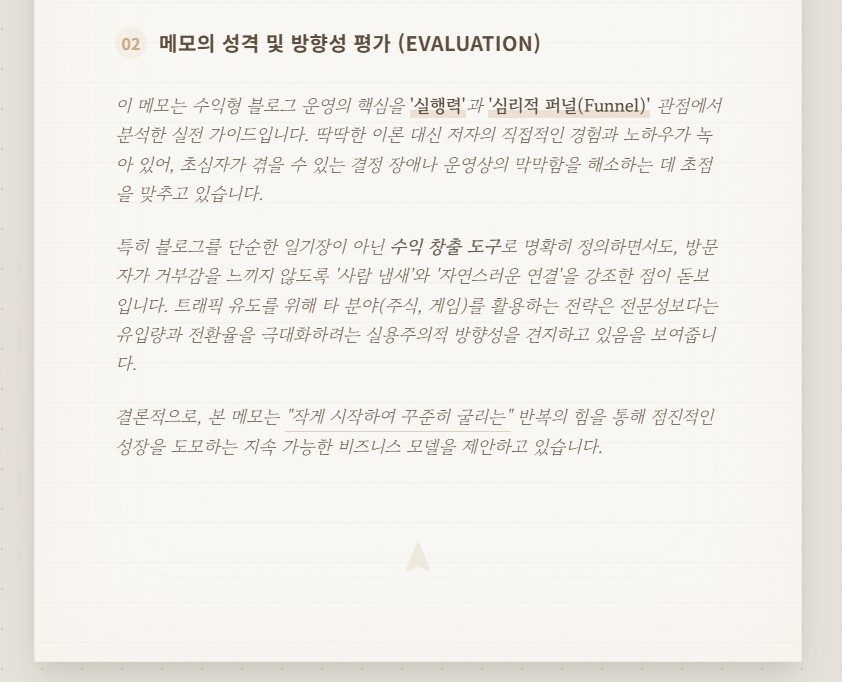
    2. 메모에 대한 평가는 어떤 성향의 메모이며 어떤 방향성에 대한 평가이다.
    3. theme는 desert로 종이노트 느낌이 느껴져야 한다.
        색상은 3가지 이상 사용하지 않는다.
    4. 한글출력을 기본으로 한다.
생성된 Opal앱의 json은 다음과 같다(우측 상단, 설정버튼에서 copy json 메뉴선택)
{
  "metadata": {
    "visual": {
      "presentation": {
        "themes": {
          "ac08b2d7-2bbe-45ba-b29c-005c1daa6b2f": {
            "template": "basic",
            "templateAdditionalOptions": {},
            "palette": {
              "primary": {
                "0": "#000000",
                "5": "#1c0e00",
                "10": "#2b1700",
                "15": "#392000",
                "20": "#472a00",
                "25": "#563400",
                "30": "#663e00",
                "35": "#764800",
                "40": "#865300",
                "50": "#a86900",
                "60": "#c7821e",
                "70": "#e69c38",
                "80": "#ffb962",
                "90": "#ffddb9",
                "95": "#ffeede",
                "98": "#fff8f4",
                "99": "#fffbff",
                "100": "#ffffff"
              },
              "secondary": {
                "0": "#000000",
                "5": "#1c0e00",
                "10": "#281805",
                "15": "#33220d",
                "20": "#3f2d17",
                "25": "#4b3821",
                "30": "#58432b",
                "35": "#644e36",
                "40": "#715a41",
                "50": "#8b7358",
                "60": "#a78c70",
                "70": "#c3a689",
                "80": "#dfc1a2",
                "90": "#fdddbd",
                "95": "#ffeede",
                "98": "#fff8f4",
                "99": "#fffbff",
                "100": "#ffffff"
              },
              "tertiary": "",
              "error": {
                "0": "#000000",
                "5": "#2d0001",
                "10": "#410002",
                "15": "#540003",
                "20": "#690005",
                "25": "#7e0007",
                "30": "#93000a",
                "35": "#a80710",
                "40": "#ba1a1a",
                "50": "#de3730",
                "60": "#ff5449",
                "70": "#ff897d",
                "80": "#ffb4ab",
                "90": "#ffdad6",
                "95": "#ffedea",
                "98": "#fff8f7",
                "99": "#fffbff",
                "100": "#ffffff"
              },
              "neutral": {
                "0": "#000000",
                "5": "#14100c",
                "10": "#1f1b16",
                "15": "#2a2520",
                "20": "#352f2a",
                "25": "#403a35",
                "30": "#4c4640",
                "35": "#58514c",
                "40": "#645d57",
                "50": "#7d766f",
                "60": "#978f89",
                "70": "#b2aaa3",
                "80": "#cec5bd",
                "90": "#ebe1d9",
                "95": "#f9efe7",
                "98": "#fff8f4",
                "99": "#fffbff",
                "100": "#ffffff"
              },
              "neutralVariant": {
                "0": "#000000",
                "5": "#170f07",
                "10": "#221a11",
                "15": "#2d241a",
                "20": "#382f24",
                "25": "#443a2f",
                "30": "#504539",
                "35": "#5c5045",
                "40": "#685c50",
                "50": "#827568",
                "60": "#9d8e81",
                "70": "#b8a99a",
                "80": "#d4c4b5",
                "90": "#f1e0d0",
                "95": "#ffeede",
                "98": "#fff8f4",
                "99": "#fffbff",
                "100": "#ffffff"
              }
            },
            "themeColors": {
              "primaryColor": "",
              "secondaryColor": "",
              "backgroundColor": "",
              "primaryTextColor": "",
              "textColor": ""
            },
            "splashScreen": {
              "storedData": {
                "handle": "drive:/1P8PdkB6s72XRwEyyvb6AHEMf-K-8RBkP",
                "mimeType": "image/png",
                "contentLength": 1674504
              }
            }
          }
        },
        "theme": "ac08b2d7-2bbe-45ba-b29c-005c1daa6b2f"
      }
    },
    "intent": "스마트 메모장 앱을 만든다. \n1. 글 또는 음성으로 메모를 입력받는다(한 개만 받으면 된다). \n2. 내용을 분석한다. \n3. 메모장의 내용을 만든다. \n\t1. 내용을 보고 제목을 만든다. \n\t2. 메모가 저장된 시간을 표시한다. \n\t3. 메모를 간략하게 리스트로 만들어 요약한다. \n\t4. 메모에 대한 평가를 한다. \n4. HTML로 출력한다. \n\t1. 리스트로 요약하는 부분은 Tree 구조의 아웃라인 형태로 표시한다.\n\t2. 메모에 대한 평가는 어떤 성향의 메모이며 어떤 방향성에 대한 평가이다.\n\t3. theme는 desert로 종이노트 느낌이 느껴져야 한다.\n\t\t색상은 3가지 이상 사용하지 않는다.\n\t4. 한글출력을 기본으로 한다.",
    "revision_intents": [],
    "raw_intent": "스마트 메모장 앱을 만든다. \n1. 글 또는 음성으로 메모를 입력받는다(한 개만 받으면 된다). \n2. 내용을 분석한다. \n3. 메모장의 내용을 만든다. \n\t1. 내용을 보고 제목을 만든다. \n\t2. 메모가 저장된 시간을 표시한다. \n\t3. 메모를 간략하게 리스트로 만들어 요약한다. \n\t4. 메모에 대한 평가를 한다. \n4. HTML로 출력한다. \n\t1. 리스트로 요약하는 부분은 Tree 구조의 아웃라인 형태로 표시한다.\n\t2. 메모에 대한 평가는 어떤 성향의 메모이며 어떤 방향성에 대한 평가이다.\n\t3. theme는 desert로 종이노트 느낌이 느껴져야 한다.\n\t\t색상은 3가지 이상 사용하지 않는다.\n\t4. 한글출력을 기본으로 한다.",
    "parameters": {}
  },
  "assets": {},
  "title": "스마트 메모장",
  "description": "글과 음성으로 메모를 만들고 관리합니다.",
  "version": "0.0.1",
  "nodes": [
    {
      "id": "node_step_memo_details_text",
      "metadata": {
        "title": "Analyze Memo Content And Generate Details",
        "visual": {
          "x": 700,
          "y": 350,
          "collapsed": "expanded",
          "outputHeight": 88
        },
        "step_intent": "Analyze the provided memo content, which can be either text or audio. From this analysis, generate a concise title for the memo, determine and display the current timestamp, create a summarized list of the memo's key points formatted as a tree-like outline, and provide a comprehensive evaluation of the memo's nature and direction. The output should be a single, structured text string containing all these details, ready for HTML rendering."
      },
      "type": "embed://a2/generate.bgl.json#module:main",
      "configuration": {
        "config$prompt": {
          "parts": [
            {
              "text": "Objective: Analyze the content provided in {{\"type\":\"in\",\"path\":\"ask_user_memo_input\",\"title\":\"Memo Input\"}}, which may be in text or audio format. You must generate a concise title for the memo, determine the current timestamp, create a summarized list of key points formatted as a tree-like outline, and provide a comprehensive evaluation of the memo's nature and direction.\n\nOutput Format: Return a single, structured text string containing the title, timestamp, outline, and evaluation. This string must be formatted with HTML tags suitable for rendering. You are done when you have produced the final HTML string.\n\nUser Input / Context: {{\"type\":\"in\",\"path\":\"ask_user_memo_input\",\"title\":\"Memo Input\"}}"
            }
          ],
          "role": "user"
        },
        "generation-mode": "agent"
      }
    },
    {
      "id": "node_step_memo_summary_html",
      "metadata": {
        "title": "Generate Themed Memo Summary HTML",
        "visual": {
          "x": 1050,
          "y": 350,
          "collapsed": "expanded",
          "outputHeight": 88
        },
        "step_intent": "Generate a complete HTML page that visually presents the memo details. The page should incorporate a 'desert' theme, evoke a paper-note feel, and adhere to a strict color palette of no more than three colors. The memo title, timestamp, and evaluation should be clearly displayed. The summarized list of memo key points must be rendered in a tree-like outline structure. All textual content in the HTML should be in Korean."
      },
      "type": "embed://a2/a2.bgl.json#module:render-outputs",
      "configuration": {
        "text": {
          "parts": [
            {
              "text": "The webpage should present the memo details within a central \"paper note\" container that evokes a desert theme.\n\n**Layout Organization:**\n- The page will feature a single, prominent \"paper note\" container, centered horizontally on the screen. This container should have a comfortable maximum width for readability, similar to a physical note or document.\n- The overall page background should subtly suggest a desert landscape, using a very light, warm, textured sand color or a minimal pattern.\n- Inside the \"paper note\" container, content should be arranged in a clear, top-down hierarchy:\n    - **Header:** The memo title should be displayed at the very top of the \"paper note\" container, prominently.\n    - **Metadata Section:** Directly below the title, the timestamp should be presented.\n    - **Main Content Section:** This primary section will house the core memo details:\n        - The summarized list of memo key points must be rendered as a tree-like outline structure, utilizing clear indentation to denote hierarchical relationships.\n        - The comprehensive memo evaluation will follow the key points, presented as a distinct paragraph or block of text.\n- Content within the \"paper note\" should have generous internal padding, mimicking the margins of a printed or handwritten document.\n\n**Style Design Language:**\n- **Visual Design Approach:** An expressive and creative design that blends the serene, earthy aesthetic of a 'desert' with the simple, tactile feel of a 'paper note'. The design should feel warm, inviting, and slightly nostalgic, while maintaining high readability and a professional presentation for the memo content.\n- **Color Scheme:** A strict three-color palette to achieve a harmonious and focused aesthetic:\n    1.  **Primary Background (Paper):** A very light, warm off-white or subtle cream (e.g., `hsl(40, 40%, 97%)` or a similar soft, aged paper tone) for the \"paper note\" container.\n    2.  **Text & Dark Accents:** A deep, muted brown or sepia (e.g., `hsl(30, 20%, 30%)` or a similar rich, earthy brown) for all textual content, borders, and subtle design elements.\n    3.  **Accent/Highlight:** A warm, sandy tan or muted ochre (e.g., `hsl(35, 40%, 65%)` or a similar natural, desert-inspired hue) for minor decorative elements, underlines, or subtle visual emphasis.\n- **Typography Style:** All textual content in Korean. Utilize a clean, highly readable sans-serif font for the main body and list items that conveys a sense of warmth and clarity. The memo title can use a slightly bolder or more distinctive, yet still legible, sans-serif font to give it prominence within the \"note\" aesthetic. Font sizes should be optimized for comfortable reading across devices, with the title being the largest, key points and evaluation at a standard body text size, and the timestamp slightly smaller and more subtle.\n- **Spacing and Layout Principles:** Generous whitespace should be applied both around the central \"paper note\" container and between content sections within the note. This open spacing enhances readability, prevents visual clutter, and contributes to the serene, clean feel of a well-organized note. Content should feel intentionally laid out, not cramped.\n- **Aesthetic Goal:** 'Earthy', 'Serene', 'Handwritten Note', 'Warm Minimalism'.\n\n**Component Guidelines:**\n- **\"Paper Note\" Container:** The central content area must visually resemble a sheet of paper. This can be achieved with its background color, a subtle border using the accent color, and perhaps a very soft, barely perceptible shadow to give it depth and presence against the page background.\n- **Tree-like Outline:** The summarized key points must be structured using semantic HTML list elements (e.g., nested `<ul>` and `<li>`) with CSS styling to create clear visual indentation and hierarchy, making the outline easy to follow.\n- **Language:** All textual content, including the title, timestamp, key points, and evaluation, must be rendered in Korean.\n- **Responsive Design:** The layout must be fully responsive, ensuring the \"paper note\" container and its contents scale and adapt gracefully across various screen sizes (from mobile phones to larger desktop displays) while preserving readability and the intended 'desert paper note' aesthetic.\n\nmemo_details_text: {{\"type\":\"in\",\"path\":\"node_step_memo_details_text\",\"title\":\"Analyze Memo Content And Generate Details\"}}"
            }
          ],
          "role": "user"
        },
        "b-system-instruction": {
          "parts": [
            {
              "text": "You are an AI Web Developer. Your task is to generate a single, self-contained HTML document for rendering in an iframe, based on user instructions and data.\n\n**Visual aesthetic:**\n    * Aesthetics are crucial. Make the page look amazing, especially on mobile.\n    * Respect any instructions on style, color palette, or reference examples provided by the user.\n    * **CRITICAL: Aim for premium, state-of-the-art designs. Avoid simple minimum viable products.**\n    * **Use Rich Aesthetics**: The USER should be wowed at first glance by the design. Use best practices in modern web design (e.g. vibrant colors, dark modes, glassmorphism, and dynamic animations) to create a stunning first impression. Failure to do this is UNACCEPTABLE.\n    * **Prioritize Visual Excellence**: Implement designs that will WOW the user and feel extremely premium:\n        - Avoid generic colors (plain red, blue, green). Use curated, harmonious color palettes (e.g., HSL tailored colors, sleek dark modes).\n        - Using modern typography (e.g., from Google Fonts like Inter, Roboto, or Outfit) instead of browser defaults.\n        - Use smooth gradients.\n        - Add subtle micro-animations for enhanced user experience.\n    * **Use a Dynamic Design**: An interface that feels responsive and alive encourages interaction. Achieve this with hover effects and interactive elements. Micro-animations, in particular, are highly effective for improving user engagement.\n    * **Thematic Specificity**: Do not just create a generic layout. Define a clear \"vibe\" or theme based on the content. Use specific aesthetic keywords (e.g., \"Glassmorphism\", \"Neobrutalism\", \"Minimalist\", \"Comic Book Style\") to guide the design.\n    * **Typography Hierarchy**: Explicitly import and use font pairings. Use a distinct Display Font for headers and a highly readable Body Font for text.\n    * **Readability**: Pay extra attention to readability. Ensure the text is always readable with sufficient contrast against the background. Choose fonts and colors that enhance legibility.\n\n**Design and Functionality:**\n    * **Component-Based Design**: Do not just dump text into blocks. Semanticize the content into distinct UI components.\n    * **Layout Dynamics**: Break the grid. Avoid strict, identical grid columns. Use asymmetrical layouts, Bento grids, or responsive flexbox layouts where some elements span full width to create visual interest and emphasize key content.\n    * **Tailwind Configuration**: Extend the Tailwind configuration within a `<script>` block to define custom font families and color palettes that match the theme.\n    * Thoroughly analyze the user's instructions to determine the desired type of webpage, application, or visualization. What are the key features, layouts, or functionality?\n    * Analyze any provided data to identify the most compelling layout or visualization of it. For example, if the user requests a visualization, select an appropriate chart type (bar, line, pie, scatter, etc.) to create the most insightful and visually compelling representation. Or if user instructions say `use a carousel format`, you should consider how to break the content and any media into different card components to display within the carousel.\n    * If requirements are underspecified, make reasonable assumptions to complete the design and functionality. Your goal is to deliver a working product with no placeholder content.\n    * Ensure the generated code is valid and functional. Return only the code, and open the HTML codeblock with the literal string \"```html\".\n    * The output must be a complete and valid HTML document with no placeholder content for the developer to fill in.\n\n**Libraries:**\n  Unless otherwise specified, use:\n    * Tailwind for CSS\n    * **CRITICAL: Use the Tailwind CDN from `https://cdn.tailwindcss.com`. Do NOT use `tailwind.min.css` or any other local Tailwind file. Always include Tailwind using: `<script src=\"https://cdn.tailwindcss.com\"></script>`**\n\n**Constraints:**\n  * **External Links:** You ARE allowed to generate external links (`<a href=\"...\">` and `window.open(...)`) to external websites (e.g. google.com, wikipedia.org) for user navigation.\n  * **NO External Embeds:** Do NOT embed any external resources (e.g. `<script src=\"...\">`, `<img src=\"...\">`, `<iframe src=\"...\">`, `<link href=\"...\">`) from external URLs. Content Security Policy (CSP) will block them.\n  * **Media Restriction:** ONLY use media URLs that are explicitly passed in the input. Do NOT generate or hallucinate any other media URLs (e.g. from placeholder sites or external CDNs).\n  * **Render All Media:** You MUST render ALL media (images, videos, audio) that are passed in. Do NOT skip or omit any provided media items. Every passed-in media URL must appear in the final HTML output.\n  * **Navigation Restriction:** Do NOT generate unneeded fake links or buttons to sub-pages (e.g. \"About\", \"Contact\", \"Learn More\") unless explicitly requested. Stick to the plan and the provided content.\n  * **Footer Restriction:** **NEVER** generate any footer content, including legal footers like \"All rights reserved\" or \"Copyright 2024\". [It is a violation of Google's policies to hallucinate legal footers.]\n"
            }
          ],
          "role": "user"
        },
        "p-render-mode": "Auto",
        "b-render-model-name": "gemini-flash"
      }
    },
    {
      "id": "ask_user_memo_input",
      "metadata": {
        "title": "Memo Input",
        "visual": {
          "x": 250,
          "y": 300,
          "collapsed": "expanded",
          "outputHeight": 88
        }
      },
      "type": "embed://a2/a2.bgl.json#21ee02e7-83fa-49d0-964c-0cab10eafc2c",
      "configuration": {
        "description": {
          "parts": [
            {
              "text": "메모 내용을 입력하거나 음성을 녹음하세요"
            }
          ],
          "role": "user"
        },
        "p-modality": "Any"
      }
    }
  ],
  "edges": [
    {
      "from": "ask_user_memo_input",
      "to": "node_step_memo_details_text",
      "out": "context",
      "in": "p-z-ask_user_memo_input"
    },
    {
      "from": "node_step_memo_details_text",
      "to": "node_step_memo_summary_html",
      "out": "context",
      "in": "p-z-node_step_memo_details_text"
    }
  ],
  "url": "drive:/1MMAidOaRXjPwDU_-BtrMMZ89ZSPTVqNU"
}
2. 생성된 Opal 앱에서 실행


생성된 Opal 앱을 실행(화면상단의 App 버튼선택 )시킨다.
그리고 이곳에서 Start를 누른 후, 음성이나 텍스트로 입력을 한다. 두서없이 내용을 기술해도 앱이 논리적으로 정리해줄 것이다. 그러므로 테스트를 위해 장황한 내용으로 예제를 만들었다.
음성입력 시 반드시 Opal의 음성입력 아이콘이 아닌 + 버튼을 누르고 업로드를 선택해야 한다. 그리고 음성관련된 앱과 연동하여 음성을 올려야 한다. 이유는 Opal의 음성인식 버튼이 한국어는 재대로 지원하지 않기 때문이다.
- opal 앱에 입력할 프롬프트
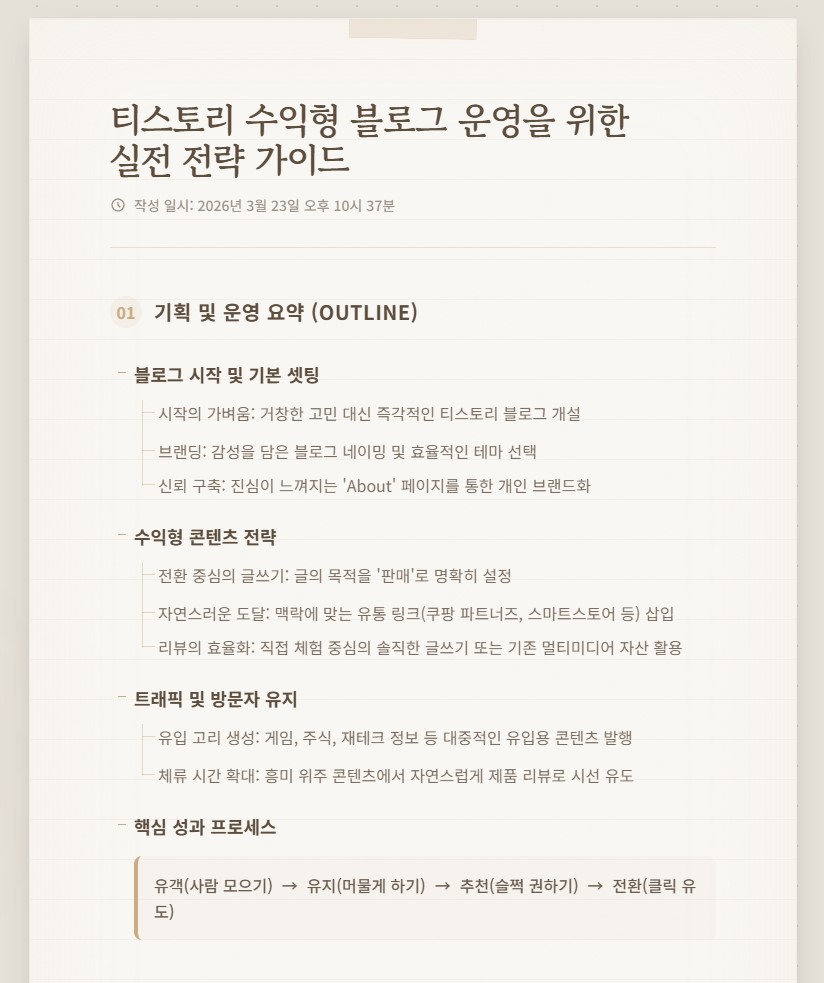
처음엔 그냥 가볍게 시작하면 돼. “아, 나도 한번 판매 블로그 해볼까?” 이런 느낌으로 말이지. 딱히 거창하게 생각할 필요 없어. 일단 티스토리 들어가서 하나 만든다, 이게 시작이야.
기존에 쓰던 티스토리가 있다면 거기에 하나 더 파는 거지. 이름은 para-bom 같은 식으로 살짝 감성 얹어서 톡 던져주고. 그러고 나면 이제 슬슬 모양을 잡아야겠지? 메뉴도 만들고, 테마도 고르고… 여기서 괜히 오래 고민하다가 시간 다 간다. 적당히 깔끔한 거 하나 딱 고르고 “오케이, 이걸로 간다” 하고 밀어붙이는 게 중요해.
그리고 about 페이지. 이거 은근 중요하다. 대충 쓰면 안 되고, “나는 이런 사람이고, 이런 걸 추천하려고 이 블로그 만들었어요” 이런 식으로 사람 냄새 나게 써줘야 돼. 너무 딱딱하면 안 되고, 너무 가벼워도 안 되고… 살짝 진심이 느껴지게.
이제 본격적으로 콘텐츠를 만들기 시작하는데, 여기서 중요한 건 하나야. “글 = 판매로 이어진다” 이걸 계속 머리에 넣고 가야 해. 글을 하나 쓰더라도 자연스럽게 링크를 슬쩍 끼워 넣는 거지. 쿠팡이면 쿠팡 파트너즈 링크 하나 툭, 네이버 쪽이면 네이버 스마트스토어 링크 하나 슥. 너무 대놓고 “사세요!” 하면 튕겨나가니까, 읽다가 자연스럽게 “어? 이거 괜찮네?” 하고 클릭하게 만드는 흐름이 중요해.
제품 리뷰할 때도 마찬가지야. 직접 써봤으면 제일 좋지. “이거 써봤는데… 음… 생각보다 괜찮네?” 이런 식으로 솔직하게 풀어주는 거야. 근데 직접 리뷰가 어렵다? 그럼 요즘 다들 하는 거 있잖아. 유튜브 영상 가져와서 “이 영상 보면 느낌 딱 온다” 하면서 연결해주는 거지. 괜히 혼자 다 하려고 하지 말고, 이미 있는 걸 잘 가져다 쓰는 것도 전략이야.
근데 여기서 한 번 더 생각해야 돼. 사람들이 왜 내 블로그에 들어오지? 그냥 제품 리뷰만 쭉 있으면 솔직히 안 들어온다. 그래서 약간 낚시… 아니, 유입용 콘텐츠가 필요해.
예를 들어 게임 링크 같은 거. “심심할 때 한 번 해보세요 ㅋㅋ” 하면서 툭 던져주면 사람들이 들어왔다가 어슬렁어슬렁 다른 글도 보게 되거든. 아니면 주식이나 재테크 정보. “오늘 뭐 올랐대, 뭐 떨어졌대” 이런 거 딱딱 올려주면 꾸준히 들어오는 사람들이 생긴다. 그러다가 자연스럽게 옆에 있는 제품 리뷰도 보게 되는 거지.
결국 흐름은 이거야.
사람을 모은다 → 머물게 한다 → 슬쩍 추천한다 → 어? 괜찮네 → 클릭.
이걸 계속 반복하는 거야. 처음엔 좀 삐걱거려. “이게 맞나?” 싶고, 조회수도 안 나오고… 근데 어느 순간 하나 터지면 “어?” 하고 올라간다. 그때부터 재미 붙는다.
툭, 시작하고… 쓱, 올리고… 계속 굴리는 거야. 이게 핵심이다.
3. 결과

'Source code or Tip > 생성AI' 카테고리의 다른 글
| [codex] playwright mcp로 웹스크래핑 (0) | 2026.04.01 |
|---|---|
| [codex] skill-creator를 이용한 pdf 워터마킹 (0) | 2026.03.26 |
| [claude] 클로드 웹, 음성메모 skills에 등록하기 (0) | 2026.03.22 |
| [claude] 클로드 웹버전에서 skill 등록하기 (0) | 2026.03.21 |
| [stitch 2] 랜딩페이지를 위한 AI 프로토타입 툴 (0) | 2026.03.20 |


