
| 일 | 월 | 화 | 수 | 목 | 금 | 토 |
|---|---|---|---|---|---|---|
| 1 | 2 | 3 | 4 | 5 | 6 | 7 |
| 8 | 9 | 10 | 11 | 12 | 13 | 14 |
| 15 | 16 | 17 | 18 | 19 | 20 | 21 |
| 22 | 23 | 24 | 25 | 26 | 27 | 28 |
Tags
- 좋은글필사하기
- 파이썬
- 명언모음
- androidx
- 소울칼리버6
- FSM
- Freesound
- Linux
- 오늘의역사
- Android
- 명언
- Firebase
- kotlin
- 코틀린
- 명상명언
- jetpack compose
- Gemini
- 오픈소스
- DART
- 장자명언
- ASMR
- Coroutine
- 공부집중
- 명심보감
- Flutter
- 생성AI
- ChatGPT
- javascript
- 이모지메모
- gemini-cli
Archives
- Today
- Total
Vintage appMaker의 Tech Blog
[codex] image 분석 후, PDF로 만들기 본문
메모이미지 To PDF
지침파일을 이용하여 codex로 메모 이미지를 pdf로 변환
codex가 실행되는 폴더에 메모를 스캔한 이미지를 저장.
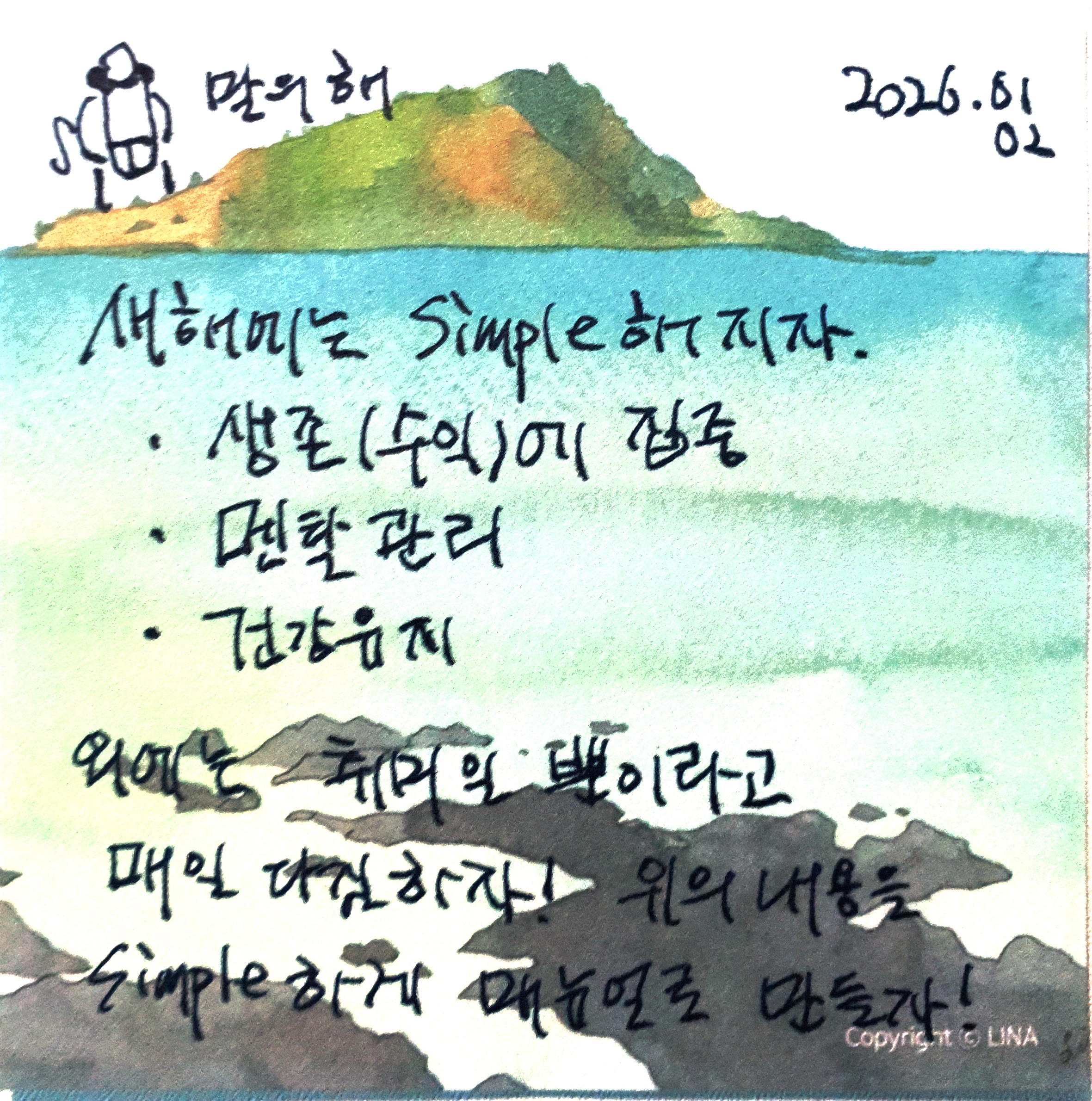
1. 지침.md
지침.md는 아래와 같다.
# 메모 이미지 To PDF
> 메모를 이미지로 변환한 파일을 PDF 양식으로 출력

## 1. 목적
- 현재 폴더에 저장된 이미지를 메모로 간주한다.
- 메모를 다음과 같은 정보로 변환한다.
    - 내용(이미지의 문자를 분석하여 내용정리)
    - 생성날짜(이미지 날짜)
    - tag(메모의 종류:성향)
- pdf로 출력하여 저장한다.


## 2. PDF로 변환법

다음 예제를 기반으로 pdf를 작성한다. 입력된 파라메터는 이미지 분석을 통해 얻은 것을 넘기는 것이다.
파라메터로 들어온 문자열은 페이지에 표시될 수 있도록 width, height에 맞게 문단을 정리해야 한다.

```python
import io
import os
from datetime import datetime

from PIL import Image, ImageOps
from reportlab.lib.utils import ImageReader
from reportlab.pdfbase import pdfmetrics
from reportlab.pdfbase.ttfonts import TTFont
from reportlab.pdfgen import canvas


PAGE_WIDTH = 448
PAGE_HEIGHT = 872


def _register_malgun_gothic():
    font_name = "MalgunGothic"
    font_path = r"C:\Windows\Fonts\malgun.ttf"
    if os.path.exists(font_path):
        if font_name not in pdfmetrics.getRegisteredFontNames():
            pdfmetrics.registerFont(TTFont(font_name, font_path))
        return font_name
    return "Helvetica"


def _get_image_creation_date(image_path):
    created_ts = os.path.getctime(image_path)
    return datetime.fromtimestamp(created_ts).strftime("%Y.%m.%d")


def _prepare_grayscale_image(image_path):
    with Image.open(image_path) as img:
        img = ImageOps.exif_transpose(img)
        img = img.convert("L")
        buf = io.BytesIO()
        img.save(buf, format="PNG")
        buf.seek(0)
        return buf


def make_scan_pdf(
    scan_image_path,
    image_created_date,
    content,
    tag,
    output_pdf_path,
):
    if not image_created_date:
        image_created_date = _get_image_creation_date(scan_image_path)

    img_buf = _prepare_grayscale_image(scan_image_path)
    img_reader = ImageReader(img_buf)

    c = canvas.Canvas(output_pdf_path, pagesize=(PAGE_WIDTH, PAGE_HEIGHT))
    font_name = _register_malgun_gothic()

    outer_margin = 18
    inner_margin = 24

    outer_x = outer_margin
    outer_y = outer_margin
    outer_w = PAGE_WIDTH - (outer_margin * 2)
    outer_h = PAGE_HEIGHT - (outer_margin * 2)

    c.setLineWidth(1.2)
    c.rect(outer_x, outer_y, outer_w, outer_h)

    image_box_w = outer_w - (inner_margin * 2)
    image_box_h = 220
    image_box_x = outer_x + inner_margin
    image_box_y = outer_y + outer_h - inner_margin - image_box_h
    c.rect(image_box_x, image_box_y, image_box_w, image_box_h)

    c.drawImage(
        img_reader,
        image_box_x + 6,
        image_box_y + 6,
        width=image_box_w - 12,
        height=image_box_h - 12,
        preserveAspectRatio=True,
        anchor="c",
    )

    text_left = image_box_x
    line_right = image_box_x + image_box_w

    date_y = image_box_y - 28
    c.setFont(font_name, 11)
    c.drawString(text_left, date_y, f"날짜: {image_created_date}")

    content_label_y = date_y - 22
    c.drawString(text_left, content_label_y, "내용:")

    content_line_y = content_label_y - 8
    c.line(text_left + 40, content_line_y, line_right, content_line_y)

    content_text_y = content_line_y - 18
    c.setFont(font_name, 10)
    c.drawString(text_left, content_text_y, content)

    mid_line_y = outer_y + 90
    c.line(text_left, mid_line_y, line_right, mid_line_y)

    c.setFont(font_name, 11)
    c.drawRightString(line_right, outer_y + 40, f"#{tag}")

    c.showPage()
    c.save()


if __name__ == "__main__":
    example_image = "scan.jpg"
    example_content = "스캔 내용 요약"
    example_tag = "태그"
    example_output = "scan_output.pdf"
    make_scan_pdf(
        example_image,
        None,
        example_content,
        example_tag,
        example_output,
    )

```

### 3. 할 일
프롬프트로 "이미지 변환"을 입력받으면 다음을 수행한다.
1. 지금폴더의 이미지 파일 검색
2. 이미지 파일별로 [pdf 변환법-python 함수]을 수행
3. 이미지 별로 pdf 생성

(*) 생성된 소스코드는 삭제하지 않는다.
(*) 어떤 파일도 삭제하지 않는다.
2. 프롬프트
지침.md 파일을 지침으로 한다. 이미지 분석 후 PDF를 만든다.3. 결과
- scan.pdf
- 생성된 파이썬소스
codex가 pdf를 만들기 위해서 프롬프트를 분석 및 그 목적에 맞는 소스를 생성한 결과물.
import io
import os
from datetime import datetime

from PIL import Image, ImageOps
from reportlab.lib.utils import ImageReader
from reportlab.pdfbase import pdfmetrics
from reportlab.pdfbase.ttfonts import TTFont
from reportlab.pdfgen import canvas


PAGE_WIDTH = 448
PAGE_HEIGHT = 872


def _register_malgun_gothic():
    font_name = "MalgunGothic"
    font_path = r"C:\Windows\Fonts\malgun.ttf"
    if os.path.exists(font_path):
        if font_name not in pdfmetrics.getRegisteredFontNames():
            pdfmetrics.registerFont(TTFont(font_name, font_path))
        return font_name
    return "Helvetica"


def _get_image_creation_date(image_path):
    created_ts = os.path.getctime(image_path)
    return datetime.fromtimestamp(created_ts).strftime("%Y.%m.%d")


def _prepare_grayscale_image(image_path):
    with Image.open(image_path) as img:
        img = ImageOps.exif_transpose(img)
        img = img.convert("L")
        buf = io.BytesIO()
        img.save(buf, format="PNG")
        buf.seek(0)
        return buf


def _wrap_text(text, font_name, font_size, max_width):
    words = text.split()
    lines = []
    current = []
    for word in words:
        candidate = " ".join(current + [word])
        if pdfmetrics.stringWidth(candidate, font_name, font_size) <= max_width:
            current.append(word)
        else:
            if current:
                lines.append(" ".join(current))
            current = [word]
    if current:
        lines.append(" ".join(current))
    return lines


def make_scan_pdf(
    scan_image_path,
    image_created_date,
    content,
    tag,
    output_pdf_path,
):
    if not image_created_date:
        image_created_date = _get_image_creation_date(scan_image_path)

    img_buf = _prepare_grayscale_image(scan_image_path)
    img_reader = ImageReader(img_buf)

    c = canvas.Canvas(output_pdf_path, pagesize=(PAGE_WIDTH, PAGE_HEIGHT))
    font_name = _register_malgun_gothic()

    outer_margin = 18
    inner_margin = 24

    outer_x = outer_margin
    outer_y = outer_margin
    outer_w = PAGE_WIDTH - (outer_margin * 2)
    outer_h = PAGE_HEIGHT - (outer_margin * 2)

    c.setLineWidth(1.2)
    c.rect(outer_x, outer_y, outer_w, outer_h)

    image_box_w = outer_w - (inner_margin * 2)
    image_box_h = 220
    image_box_x = outer_x + inner_margin
    image_box_y = outer_y + outer_h - inner_margin - image_box_h
    c.rect(image_box_x, image_box_y, image_box_w, image_box_h)

    c.drawImage(
        img_reader,
        image_box_x + 6,
        image_box_y + 6,
        width=image_box_w - 12,
        height=image_box_h - 12,
        preserveAspectRatio=True,
        anchor="c",
    )

    text_left = image_box_x
    line_right = image_box_x + image_box_w

    date_y = image_box_y - 28
    c.setFont(font_name, 11)
    c.drawString(text_left, date_y, f"날짜: {image_created_date}")

    content_label_y = date_y - 22
    c.drawString(text_left, content_label_y, "내용:")

    content_line_y = content_label_y - 8
    c.line(text_left + 40, content_line_y, line_right, content_line_y)

    content_text_y = content_line_y - 18
    content_font_size = 10
    c.setFont(font_name, content_font_size)

    max_text_width = line_right - text_left
    lines = _wrap_text(content, font_name, content_font_size, max_text_width)
    line_height = 14
    y = content_text_y
    min_y = outer_y + 110
    for line in lines:
        if y < min_y:
            break
        c.drawString(text_left, y, line)
        y -= line_height

    mid_line_y = outer_y + 90
    c.line(text_left, mid_line_y, line_right, mid_line_y)

    c.setFont(font_name, 11)
    c.drawRightString(line_right, outer_y + 40, f"#{tag}")

    c.showPage()
    c.save()


def main():
    memo_data = {
        "scan.jpg": {
            "content": (
                "삶을 단순하게 지내자. "
                "생존(수입) 정돈, 멘탈 관리, 건강 유지를 매일 다짐하고 "
                "위의 내용을 simple하게 매뉴얼로 만들자."
            ),
            "tag": "다짐/자기관리",
            "image_created_date": "2026.01.01",
        }
    }

    image_exts = {".jpg", ".jpeg", ".png", ".bmp", ".tif", ".tiff"}
    for filename in os.listdir("."):
        ext = os.path.splitext(filename)[1].lower()
        if ext not in image_exts:
            continue
        data = memo_data.get(filename)
        if not data:
            continue
        output_pdf = os.path.splitext(filename)[0] + ".pdf"
        make_scan_pdf(
            filename,
            data.get("image_created_date"),
            data.get("content", ""),
            data.get("tag", "메모"),
            output_pdf,
        )


if __name__ == "__main__":
    main()
'Source code or Tip > 생성AI' 카테고리의 다른 글
| [gemini] opal을 이용한 프리젠테이션 만들기 (0) | 2026.01.24 |
|---|---|
| [gemini-cli] youtube 분석 (0) | 2026.01.16 |
| [gemini-cli] Google Stitch를 통한 빠른 웹개발 (0) | 2025.12.19 |
| [gemini] google sheet로 지역별 날씨정보 가져오기 (0) | 2025.12.13 |
| [codex] pdf 에디팅하기 (0) | 2025.12.05 |
'Source code or Tip/생성AI' Related Articles
more


Comments